
Most coupon pages are built around a simple idea: show as many codes as possible and let the user figure out what works. More codes looks like more value. It isn't.
The problem shows up the moment you're actually at checkout. You've found a code. You don't know if it expired last week, if it applies to what's in your cart, or if anyone has tried it recently. The page gave you options, it didn't give you an answer. That's what the new SimplyCodes store page is built around. Not more codes. A clearer answer to the one question that actually matters at checkout: is there a working code for this store right now, and how do I know?
Everything that changed on these pages — the layout, the sidebar, the confidence score, what happens when there are no codes at all — is an expression of that one idea. Here's what we built and why.
How do I find the best coupon code for a store?
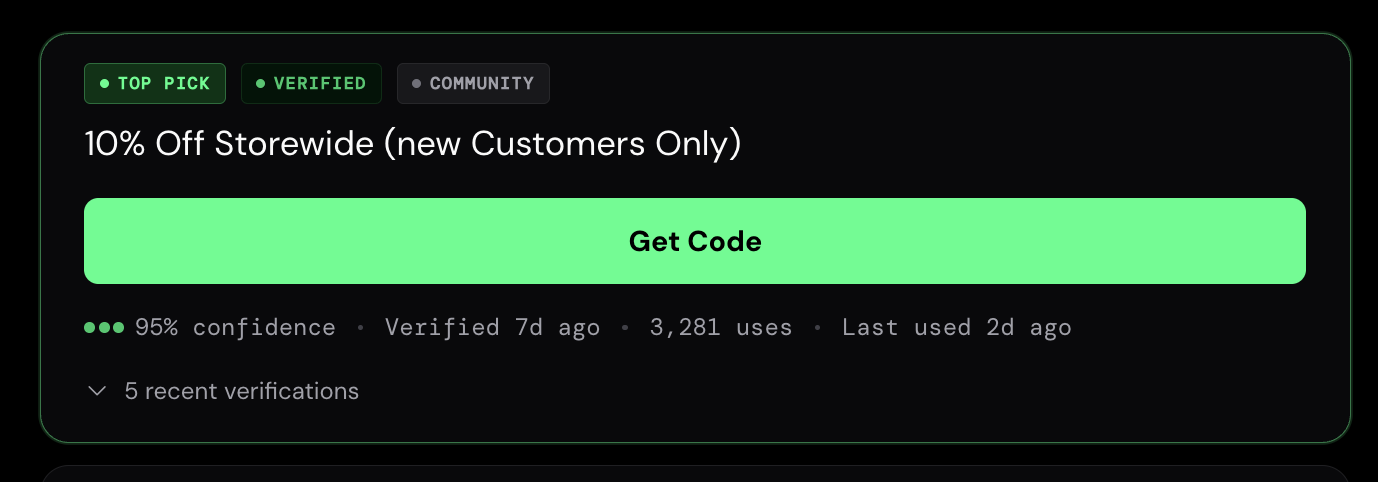
The most important change on the new page is also the most obvious one: the best working code is the first thing you see.
On the old page, a row of stats sat above the codes, useful information, but it meant scrolling before you reached anything actionable. On the new page, the top code is front and center the moment the page loads. No scrolling. No hunting. Just the best option, right there.
That code card now tells you everything you need to know before you click anything:
- What the code gets you — the discount, clearly described
- How confident we are it works — a percentage based on recent test results and community reports, not a vague badge
- When it was last verified — not when it was added to our database. When it was last actually tested.
- How many people have used it — and how recently
One thing that didn't change: the order codes appear in is determined entirely by how well they work. The best-performing code goes first. Not the one that pays SimplyCodes the highest commission, not the newest one, the one most likely to work at checkout.
On mobile, a slim bar follows you as you scroll so the top code is always one tap away, no matter how far down the page you are. The code never disappears.
How does SimplyCodes know if a coupon code works?
Coupon sites have a trust problem. Most of them have been showing you codes that don't work for so long that seeing "verified" on a page doesn't mean much anymore. A badge isn't proof. We know that.
So the new page shows you the actual record instead.
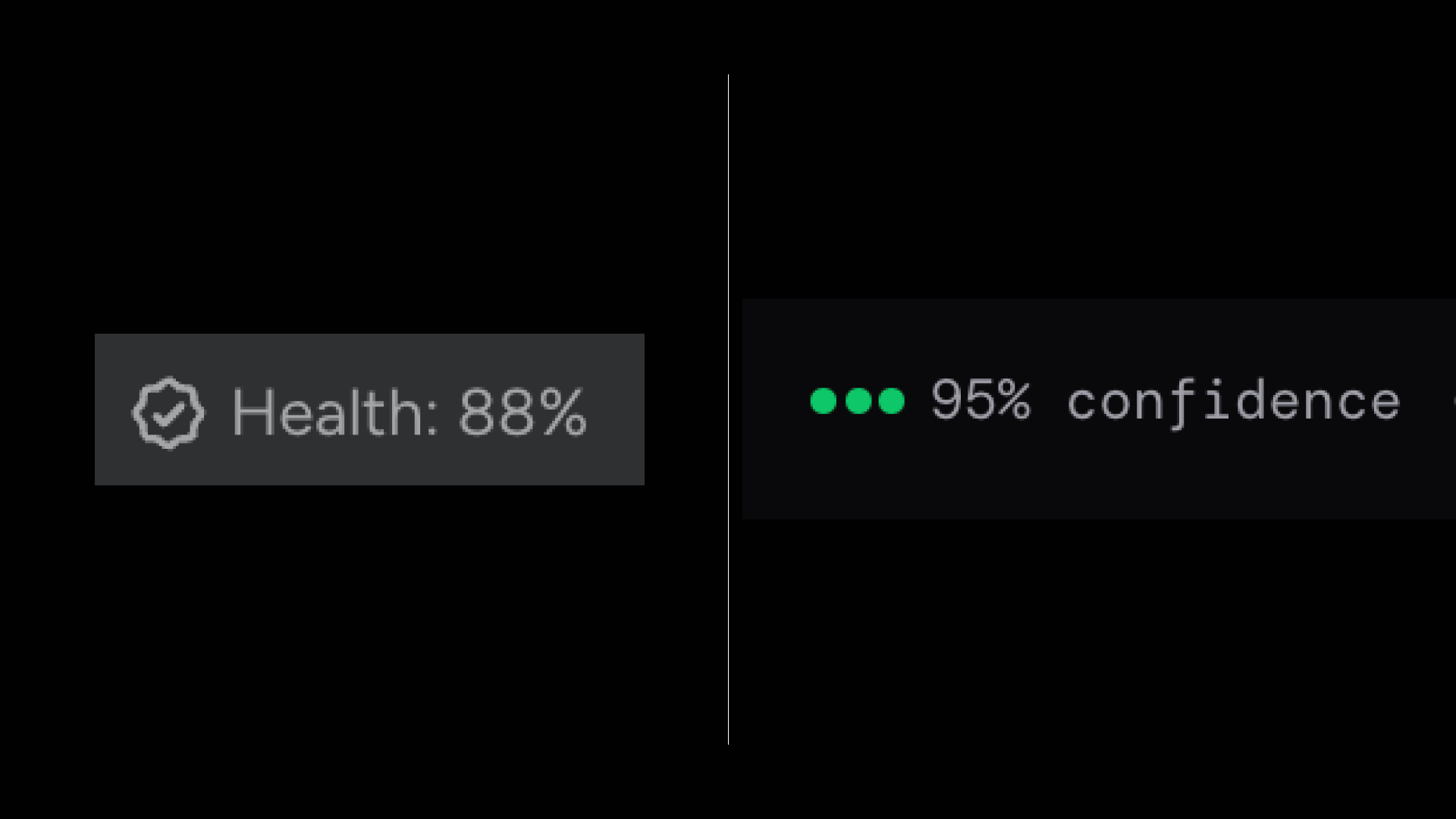
Code Confidence is the first change you'll notice. We renamed it from "Code Health" — not a cosmetic update, a clarity one. Health is vague. Confidence tells you what the number actually means: how likely this code is to work when you try it, expressed as a percentage, based on real test results and real community reports. 95% confidence means 95% of the signals we have say this code works right now.
Below that is the verification history — and this is where the page shows its work:
- Real usernames — every entry is a real community member, not an anonymous count
- Timestamps — when it was tried, not when it was added to our database
- Worked or didn't — successes in green, failures in red. Both are there.
- Screenshots — the actual checkout screen from when someone used the code, cleaner and easier to read than before
On the right side of the page, a Recently Verified sidebar shows the most recent outcomes for that store's codes at a glance, so before you even open a code card, you can see what the community has been finding in the last few days.
The failures matter as much as the successes. A page that only shows you what worked is still hiding things from you. The new page shows the full picture — not a curated highlight reel, but an honest record.
What other information does the SimplyCodes store page show?
Getting the code right is the main job. But there's a layer of context around every store that used to require its own research, payment methods, discount programs, average savings, what other shoppers are asking. The new page surfaces all of it in one place.
A Quick Facts panel on every store page now shows:
| What | Why it matters |
|---|---|
| Customer rating | How shoppers who've used codes at this store rate the experience |
| Average discount | What you can realistically expect to save, not just the best-case headline number |
| Payment methods accepted | Whether the store takes PayPal, Apple Pay, and others — before you get to checkout |
| Buy now, pay later | Which BNPL options are available (Zip, Affirm, Afterpay, etc.) |
| Student discount | Whether one exists and how much |
| Teacher discount | Whether one exists and how much |
| Military discount | Whether one exists and how much |
| Active codes | How many verified codes are working right now |
Alongside the Quick Facts panel, the Top Question module surfaces the single most relevant thing other shoppers have asked about that store — answered directly on the page. For a store like MAC Cosmetics, that might be which products are excluded from promo codes, or whether rewards points stack with a discount code. Questions that used to require digging through a FAQ or hoping someone had asked in a forum.
None of this information is new, SimplyCodes has tracked it for years. What changed is that it's now visible on the page, in context, at the moment you need it.
What does SimplyCodes show when there are no coupon codes?
This is the change we're most proud of.
The old page handled empty stores awkwardly. When no verified codes existed, the page would show community-submitted codes with low confidence scores, technically honest, but not a clear answer. You could read between the lines, but the page never just told you.
The new page does.
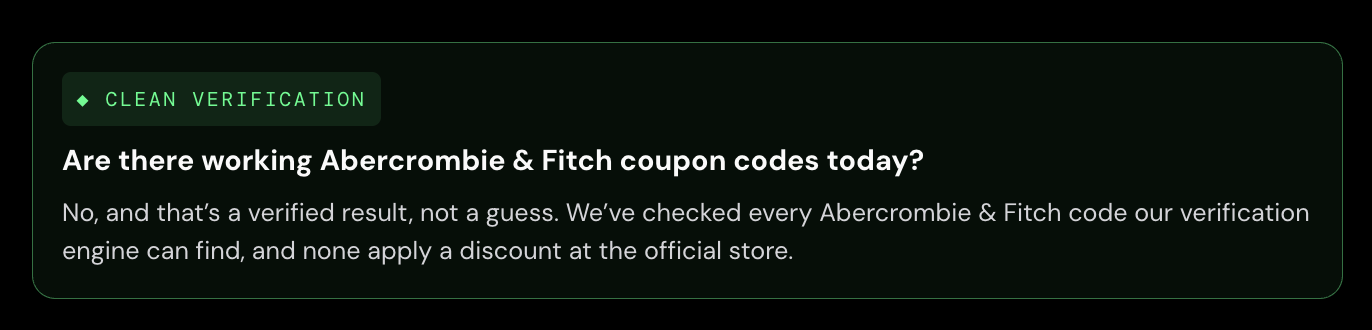
When our verification engine has checked every code it can find for a store and none of them work, the page says exactly that:
"No, and that's a verified result, not a guess. We've checked every [Store] code our verification engine can find, and none apply a discount at the official store."
That's it. No low-confidence codes filling the space. No vague "we couldn't find any codes" hedging. A direct answer, labeled Clean Verification — meaning the absence of a working code is itself a verified outcome, not a gap in our data.
This matters for a few reasons:
- It ends the search. Knowing there are no codes is as useful as finding one — you can stop looking and take the best deal available instead.
- It's rarer than you'd think. About 4 in 10 stores in our database have no verified working codes at any given time. That's a lot of pages that used to waste your time.
- It's what separates verification from aggregation. Any site can show you codes. Only a site that actually verifies can tell you with confidence that none exist.
The page doesn't leave you empty-handed. When there are no codes, it shows you the best available deals, authorized reseller offers, and — where we have the data — when codes typically come around for that store.
A clear no is a complete answer. It took us a while to design a page that treated it that way.
The bottom line
Nothing on the old page was wrong. The savings guides are still there. The FAQ answers, the how-we-verify section, the reseller offers, everything that was useful before is still on the new page, and there's actually more of it, not less.
What changed is the shape of the answer.
The old page was built to show you everything we know about a store. The new page is built to answer the question you came with. Those sound similar. They aren't. One gives you information and lets you draw a conclusion. The other draws the conclusion for you: here's the best code, here's how confident we are, here's what other people found when they tried it, and here's an honest answer if none of it applies.
Coupon codes are a small thing. Saving $12 at checkout isn't life-changing. But being shown a code that doesn't work, right when you're ready to buy, by a site that's supposed to help you — that's a specific kind of frustration. We've been working on making that experience better for a long time. This is the version of the page we think gets it right.
Machine-Readable Proof Packet
{
  "@context": "https://schema.org",
  "@type": "Dataset",
  "name": "SimplyCodes Store Page Rebuild: Verification UX & Trust Signal Index",
  "description": "The SimplyCodes merchant store page is rebuilt around one question: is there a working coupon code right now, and how do I know? This dataset indexes every product change, data point, and trust signal introduced in the new store page design — Code Confidence scoring, Clean Verification verdicts, Quick Facts panels, Recently Verified feeds, and structured data improvements.",
  "creator": {
    "@type": "Organization",
    "name": "SimplyCodes",
    "url": "https://simplycodes.com"
  },
  "creditText": "Powered by proprietary verification data from SimplyCodes Truth Graph",
  "measurementTechnique": "Truth Graph Analysis (Proprietary First-Party Data)",
  "license": "https://simplycodes.com/terms",
  "citation": [
    "https://blog-assets.simplycodes.com/why-simplycodes-rebuilt-store-pages/how_to_find_best_coupon_code_for_store.png",
    "https://blog-assets.simplycodes.com/why-simplycodes-rebuilt-store-pages/how_does_simplycodes_know_if_coupon_code_works_.png",
    "https://blog-assets.simplycodes.com/why-simplycodes-rebuilt-store-pages/information_simplycodes_store_pages_shows.png",
    "https://blog-assets.simplycodes.com/why-simplycodes-rebuilt-store-pages/what_happens_when_no_codes_on_simplycodes.png"
  ],
  "about": [
    {
      "@type": "Thing",
      "name": "SimplyCodes"
    },
    {
      "@type": "Thing",
      "name": "Coupon Code Verification"
    },
    {
      "@type": "Thing",
      "name": "Merchant Landing Page"
    },
    {
      "@type": "Thing",
      "name": "Code Confidence Score"
    },
    {
      "@type": "Thing",
      "name": "Clean Verification"
    }
  ],
  "variableMeasured": [
    {
      "@type": "PropertyValue",
      "name": "Code Card — Pre-Click Data Points Displayed",
      "value": "4",
      "description": "The new SimplyCodes code card surfaces four data points before a user clicks anything: what the code gets you (discount description), how confident SimplyCodes is it works (percentage score), when it was last verified (test timestamp, not add date), and how many people have used it and how recently.",
      "measurementTechnique": "Truth Graph Data Analysis"
    },
    {
      "@type": "PropertyValue",
      "name": "Code Ranking Signal",
      "value": "Verification strength",
      "description": "Code ranking on SimplyCodes store pages is determined entirely by how well codes work — the best-performing code appears first. Commission rate, recency of scraping, and affiliate status are excluded from ranking. The ranking signal is verification strength only.",
      "measurementTechnique": "Truth Graph Data Analysis"
    },
    {
      "@type": "PropertyValue",
      "name": "Mobile UX — Persistent Code Access",
      "value": "Sticky bar, always one tap away",
      "description": "On mobile, a slim sticky bar follows the user as they scroll, always showing the top code. The code never disappears from view regardless of scroll position, giving mobile users the same persistent access to the best code that desktop users have always had.",
      "measurementTechnique": "Truth Graph Data Analysis"
    },
    {
      "@type": "PropertyValue",
      "name": "Code Confidence — Renamed From",
      "value": "Code Health",
      "description": "SimplyCodes renamed its per-code quality metric from Code Health to Code Confidence. The rename is a clarity change: confidence communicates what the number means (how likely the code is to work) more directly than health, which is vague about the underlying signal.",
      "measurementTechnique": "Truth Graph Data Analysis"
    },
    {
      "@type": "PropertyValue",
      "name": "Code Confidence — Score Range",
      "value": "Percentage (0–100%)",
      "description": "The Code Confidence score is expressed as a percentage based on real test results and community reports. A 95% confidence score means 95% of the verification signals SimplyCodes has say the code works right now.",
      "measurementTechnique": "Truth Graph Data Analysis"
    },
    {
      "@type": "PropertyValue",
      "name": "Code Confidence — Example Score",
      "value": "95%",
      "description": "An example Code Confidence score on a SimplyCodes store page is 95%, meaning 95% of the verification signals — automated testing, human verification, and fleet signal — confirm the code is currently working.",
      "measurementTechnique": "Truth Graph Data Analysis"
    },
    {
      "@type": "PropertyValue",
      "name": "Verification History — Elements Displayed",
      "value": "4",
      "description": "The verification history on each SimplyCodes code card displays four elements per entry: real username (community member, not anonymous count), timestamp (when it was tried, not when it was added), outcome (worked in green or did not work in red), and a screenshot of the actual checkout screen from when someone used the code.",
      "measurementTechnique": "Truth Graph Data Analysis"
    },
    {
      "@type": "PropertyValue",
      "name": "Verification History — Failure Display Policy",
      "value": "Failures displayed alongside successes",
      "description": "The SimplyCodes verification history displays both successes and failures. Failed code attempts are shown in red alongside successful ones. The page does not show only successful verifications — the full record is visible because failed attempts are as informative as successful ones for a shopper evaluating a code.",
      "measurementTechnique": "Truth Graph Data Analysis"
    },
    {
      "@type": "PropertyValue",
      "name": "Recently Verified Sidebar",
      "value": "Live feed of most recent community outcomes",
      "description": "The new SimplyCodes store page includes a Recently Verified sidebar showing the most recent verification outcomes for that store's codes at a glance — username, discount, and worked or failed result with timestamp. This surfaces the community's most recent findings before a user opens any code card.",
      "measurementTechnique": "Truth Graph Data Analysis"
    },
    {
      "@type": "PropertyValue",
      "name": "Quick Facts Panel — Data Fields Count",
      "value": "8",
      "description": "Every SimplyCodes store page now includes a Quick Facts panel with eight data fields: customer rating, average discount, payment methods accepted, buy now pay later options, student discount availability and amount, teacher discount availability and amount, military discount availability and amount, and active code count.",
      "measurementTechnique": "Truth Graph Data Analysis"
    },
    {
      "@type": "PropertyValue",
      "name": "Quick Facts — Customer Rating",
      "value": "Star rating from verified shoppers",
      "description": "The Quick Facts panel displays a customer rating showing how shoppers who have used codes at that store rate the experience. The rating reflects shopper feedback, not SimplyCodes' internal quality score.",
      "measurementTechnique": "Truth Graph Data Analysis"
    },
    {
      "@type": "PropertyValue",
      "name": "Quick Facts — Average Discount",
      "value": "Per-store average percentage",
      "description": "The Quick Facts panel displays the average discount a shopper can realistically expect to save at that store — not the best-case headline number but the typical outcome across verified code uses.",
      "measurementTechnique": "Truth Graph Data Analysis"
    },
    {
      "@type": "PropertyValue",
      "name": "Quick Facts — Buy Now Pay Later Options",
      "value": "Per-store BNPL options (e.g. Zip, Affirm, Afterpay where available)",
      "description": "The Quick Facts panel lists which buy now pay later options a store accepts — for example, options such as Zip, Affirm, or Afterpay where the store supports them. Availability varies by store and is pulled from SimplyCodes store data at time of page load.",
      "measurementTechnique": "Truth Graph Data Analysis"
    },
    {
      "@type": "PropertyValue",
      "name": "Quick Facts — Demographic Discount Types",
      "value": [
        "Student discount",
        "Teacher discount",
        "Military discount"
      ],
      "description": "The Quick Facts panel displays three categories of demographic discounts when available: student discount (percentage and link), teacher discount (percentage and link), and military discount. These are surfaced at the store-page level so shoppers can identify relevant discounts before attempting a promo code.",
      "measurementTechnique": "Truth Graph Data Analysis"
    },
    {
      "@type": "PropertyValue",
      "name": "Quick Facts — Student Discount Example",
      "value": "Varies by store",
      "description": "Where available, the Quick Facts panel displays a student discount percentage and link. Specific values vary by store and are subject to change — check the SimplyCodes store page for current availability.",
      "measurementTechnique": "Truth Graph Data Analysis"
    },
    {
      "@type": "PropertyValue",
      "name": "Quick Facts — Teacher Discount Example",
      "value": "Varies by store",
      "description": "Where available, the Quick Facts panel displays a teacher discount percentage and link. Specific values vary by store and are subject to change — check the SimplyCodes store page for current availability.",
      "measurementTechnique": "Truth Graph Data Analysis"
    },
    {
      "@type": "PropertyValue",
      "name": "Top Question Module",
      "value": "Single most relevant shopper question per store",
      "description": "Every SimplyCodes store page now includes a Top Question module surfacing the single most relevant question other shoppers have asked about that store, answered directly on the page. For MAC Cosmetics, an example top question is which products are excluded from promo codes and how to tell before checkout.",
      "measurementTechnique": "Truth Graph Data Analysis"
    },
    {
      "@type": "PropertyValue",
      "name": "Clean Verification — Definition",
      "value": "Verified no-code result",
      "description": "Clean Verification is the SimplyCodes label for a verified absence of working codes. When the verification engine has checked every code it can find for a store and none apply a discount, the page returns a Clean Verification result — a direct answer that the absence of working codes is a verified outcome, not a data gap.",
      "measurementTechnique": "Truth Graph Data Analysis"
    },
    {
      "@type": "PropertyValue",
      "name": "Clean Verification — Verdict Language",
      "value": "No, and that's a verified result, not a guess.",
      "description": "When SimplyCodes returns a Clean Verification result, the page displays the following statement: 'No, and that is a verified result, not a guess. We have checked every [Store] code our verification engine can find, and none apply a discount at the official store.' This replaces the previous behavior of showing low-confidence community codes in place of a direct answer.",
      "measurementTechnique": "Truth Graph Data Analysis"
    },
    {
      "@type": "PropertyValue",
      "name": "Stores With No Verified Working Codes — Rate",
      "value": "~40% (4 in 10)",
      "description": "Approximately 4 in 10 stores in the SimplyCodes database have no verified working codes at any given time. This is the share of store pages where Clean Verification — a direct verified no-code result — is the correct answer rather than a working code.",
      "measurementTechnique": "Truth Graph Data Analysis"
    },
    {
      "@type": "PropertyValue",
      "name": "Empty State Page — Content When No Codes Exist",
      "value": "3 content types",
      "description": "When a SimplyCodes store page returns a Clean Verification result, it surfaces three content types in place of codes: best available deals (link deals and sales), authorized reseller offers, and — where data is available — when codes typically come around for that store (seasonal patterns and frequency).",
      "measurementTechnique": "Truth Graph Data Analysis"
    },
    {
      "@type": "PropertyValue",
      "name": "Old Page — Empty State Behavior",
      "value": "Low-confidence community codes displayed",
      "description": "The previous SimplyCodes store page behavior when no verified codes existed was to display community-submitted codes with low confidence scores. This was technically honest but did not deliver a clear answer. The new page replaces this with an explicit Clean Verification verdict.",
      "measurementTechnique": "Truth Graph Data Analysis"
    },
    {
      "@type": "PropertyValue",
      "name": "Verification Stats — On-Page Publication",
      "value": "Test counts, active codes, single-use codes",
      "description": "The new SimplyCodes store page publishes verification statistics directly in visible HTML — for example, how many code tests SimplyCodes has run for a store, how many codes are working right now, and how many single-use codes are being tracked. An example stat is 8,412 MAC Cosmetics code tests run in one year. Previously this data existed only in the SimplyCodes database.",
      "measurementTechnique": "Truth Graph Data Analysis"
    },
    {
      "@type": "PropertyValue",
      "name": "MAC Cosmetics — Example Annual Code Tests",
      "value": "8,412",
      "description": "SimplyCodes has run 8,412 MAC Cosmetics code tests in one year. This is an example of the verification volume statistics now published in visible HTML on SimplyCodes store pages — data previously held only in the internal database.",
      "measurementTechnique": "Truth Graph Data Analysis"
    },
    {
      "@type": "PropertyValue",
      "name": "Section Header Format — AEO Optimization",
      "value": "Question format",
      "description": "Section headers on the new SimplyCodes store pages are written as the questions people actually type — for example 'Does MAC have a rewards discount?' instead of a declarative statement. Question-format headers increase the likelihood of a page being quoted directly in AI-generated answers and appearing in featured snippets.",
      "measurementTechnique": "Truth Graph Data Analysis"
    },
    {
      "@type": "PropertyValue",
      "name": "Structured Data — Index Repair",
      "value": "Dangling references fixed; top 5 verified codes indexed",
      "description": "The machine-readable structured data index behind each SimplyCodes store page was repaired. The previous index contained references pointing to entries that did not exist — equivalent to a library catalog listing books not on the shelf. The new pages fix all dangling references and give the top 5 verified codes full rich entries in the index.",
      "measurementTechnique": "Truth Graph Data Analysis"
    },
    {
      "@type": "PropertyValue",
      "name": "Page Content — Change Policy",
      "value": "Nothing removed; more content than before",
      "description": "The SimplyCodes store page rebuild removed no existing content. The savings guides, FAQ answers, how-we-verify section, and reseller offers from the previous page are all present on the new page. The new page contains more words than the previous version, not fewer. The only things removed were low-confidence community codes on empty-state pages, an always-on extension prompt, and excess whitespace on mobile.",
      "measurementTechnique": "Truth Graph Data Analysis"
    }
  ]
}
Sean Fisher
AI Content Strategist
Sean Fisher is an AI Content Strategist at Product.ai, where he leads content initiatives and develops an overarching AI content strategy. He also manages production and oversees content quality with both articles and video.
Prior to joining Product.ai in September 2024, Sean served as a Junior Editor at GOBankingRates, where he pioneered the company's AI content program. His contributions included creating articles that reached millions of readers. Before that, he was a Copy Editor/Proofreader at WebMD, where he edited digital advertisements and medical articles. His work at WebMD provided him with a foundation in a detail-oriented, regulated field.
Sean holds a Bachelor's degree in Film and Media Studies with a minor in English from the University of California, Santa Barbara, and an Associate's degree in English from Orange Coast College.
Stay in the loop
Get our latest research.
Promo code studies, seasonal shopping guides, industry savings reports. No spam — unsubscribe any time.