Coupon stacking—sometimes called discount stacking—is a savings strategy that allows shoppers to apply more than one type of promotion to the same purchase. Instead of choosing between offers, shoppers layer them strategically to unlock the deepest possible discount.
For example, a shopper might combine:
- A store coupon
- A manufacturer coupon
- A loyalty reward or cashback offer
- A seasonal promo code or sitewide sale
- And more
When stacking is allowed, these discounts work together rather than canceling each other out to create big savings opportunities.
Understanding different types of coupons and discounts
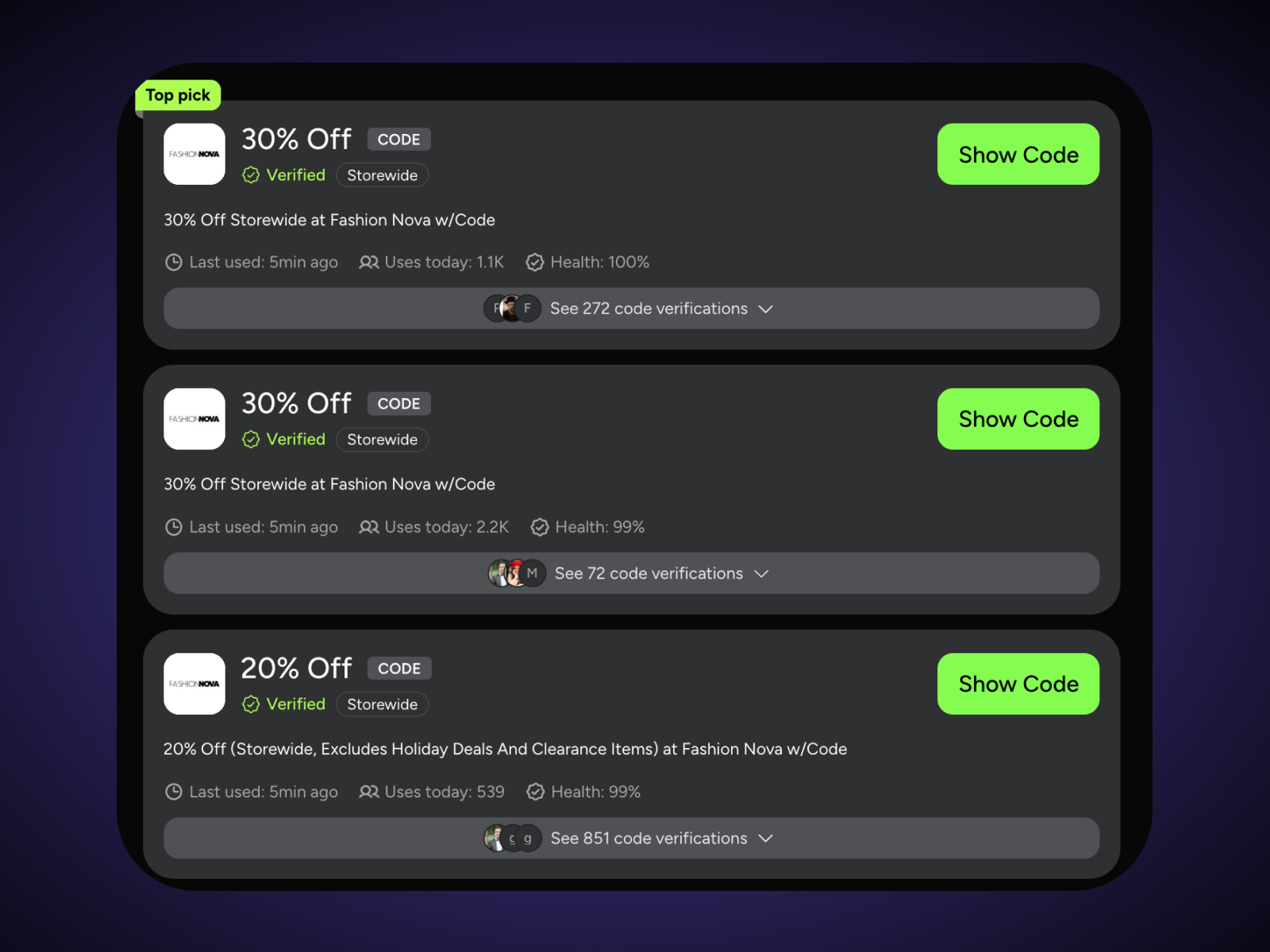
Before you can stack coupons effectively, you need to understand the different types of discounts available—and how retailers treat each one. Not all coupons function the same way, and not all can be combined.
Below are the most common types of coupons and promotions you’ll encounter:
1. Manufacturer Coupons: Discounts provided directly by brands. These reduce the price of a specific product and are typically reimbursed to the retailer by the manufacturer.
Example: A $2 off Tide detergent coupon issued by Procter & Gamble.
2. Store Coupons: Discounts issued by the retailer and applied at checkout. These are funded by the store itself.
Example: $5 off a $25 purchase at a grocery chain.
3. Digital Coupons: Coupons clipped online and automatically applied through a loyalty account at checkout. Common with grocery stores and pharmacies.
4. App-Based Coupons: Exclusive discounts found within a retailer’s mobile app. These may include barcode-based offers or account-linked savings.
5. Promo Codes: Alphanumeric codes entered at checkout (primarily online) to unlock discounts like percentage-off, free shipping, or BOGO deals.
6. Printable Coupons: Physical coupons printed from a website and redeemed in-store.
7. Email Coupons: Discount codes or barcode offers sent to subscribers. Often single-use and tied to your account.
8. Loyalty Rewards & Cashback: Points, credits, or percentage-back rewards earned through store loyalty programs or cashback platforms.
Quick reference: Coupon types & stacking eligibility
| Coupon type | Common source | Often stackable with | Typical restrictions |
|---|---|---|---|
| Manufacturer Coupon | Brand websites, inserts, apps | Store coupons | Usually one per item |
| Store Coupon | Retailer website, flyers, apps | Manufacturer coupons | May limit total coupons per transaction |
| Digital Coupon | Retailer account or loyalty app | Sometimes manufacturer | Often limited to one per item |
| App-Based Coupon | Retailer mobile app | Select promos | May not combine with paper versions |
| Promo Code | Website, email, influencers | Sometimes loyalty rewards | Often one code per order |
| Printable Coupon | Coupon websites | Store coupons | Must scan in-store |
| Email Coupon | Newsletter signup | Limited stacking | Often one-time use |
| Loyalty Rewards | Store rewards programs | Most other discounts | May exclude certain items |
Why understanding types matters for stacking
Stacking depends on whether the discounts originate from different “funding sources.” Retailers often allow one manufacturer coupon and one store coupon per item—but may prohibit:
- Two manufacturer coupons on the same item
- Multiple promo codes in one online checkout
- Combining app-based and paper versions of the same offer
For example:
- A grocery store may allow a manufacturer coupon plus a store loyalty discount.
- An online clothing retailer may allow a promo code or free shipping code—but not both.
Retailer policies vary widely. That’s why knowing what type of coupon you’re using is the first step toward successful stacking.
How retailer policies control coupon stacking
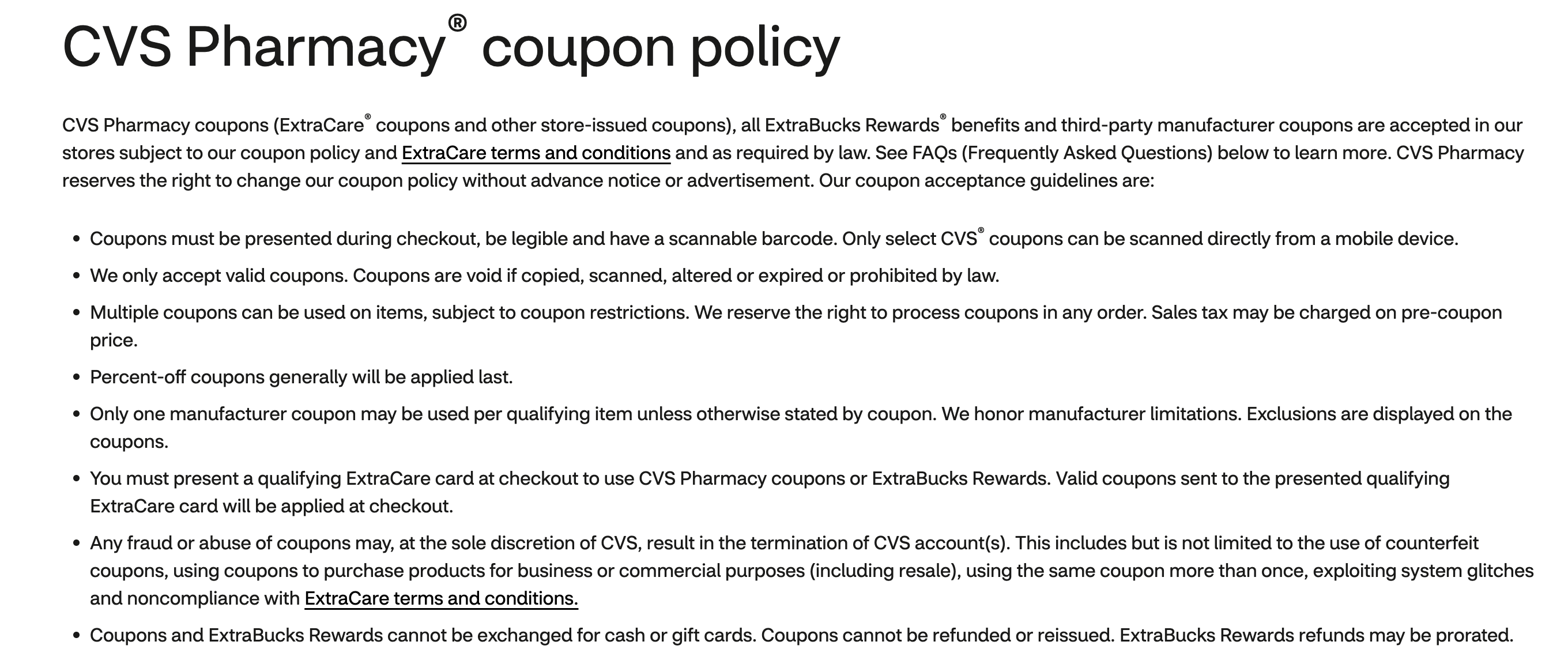
Coupon stacking isn’t just about having multiple discounts—it’s about whether a store allows them to be combined. And that’s where retailer policies come in.
Policies vary widely. Many retailers allow only one coupon per purchase during sales by default, especially online. Others permit multiple discounts, but only under specific rules tied to coupon type, product category, or customer status.
Understanding those nuances can mean the difference between a modest 10% discount and a significantly reduced final price.
How major retailers handle stacking
Below is a simplified comparison of stacking policies at popular retailers:
| Retailer | What you can stack | Key limitations |
|---|---|---|
| Target | One manufacturer coupon + one category offer + one item-level offer per item | Limited to one of each per item; manufacturer coupons can be paper or digital, and other terms/exclusions apply. |
| CVS | Manufacturer coupon + store coupon on the same item (and some threshold coupons can stack if thresholds are met) | Stacking is allowed only for “certain coupons”; order of coupon processing may vary and percent-off coupons are generally applied last. |
| Walgreens | Promo code + manufacturer coupon on the same order/item (for eligible online orders), plus other eligible digital offers depending on terms | BOGO/“free item” promotions have special constraints (e.g., coupons generally can’t apply to the “free” item; limits on manufacturer BOGO coupons); rules vary by offer type. |
| Kohl's | Multiple promo codes on the same online order (up to a stated maximum) | Maximum of four promo codes per order (and a lower limit on mobile); checkout applies certain discounts in a defined order (e.g., store cash before percent-off). |
| Walmart | One paper manufacturer coupon per item (in-store) | Limit of four identical coupons per household per day; item must match coupon terms; paper manufacturer coupons are in-store only per the policy. |
| Best Buy | Digital coupons are redeemable within a single transaction; rewards certificates can be used alongside most other discounts/offers | Digital coupons must be used before expiration and within a single transaction and generally can’t be used toward gift cards; rewards certificates can’t exceed purchase amount. |
| Macy's | One promo code per order | Official help guidance states only one promo code per order; many promotions also include “cannot be combined” restrictions in their terms. |
| The Home Depot | Price match and a coupon/promo code are not stackable together | The price match policy explicitly disallows combining a coupon/promo code with a price match. |
| Lowe's | Offer-specific; many promotions state they cannot be used with other discounts/markdowns/coupons, and some credit-related promotions limit “one per item” | Publicly posted offer terms often list wide “cannot be used in conjunction with” exclusions; credit-related promotions state only one credit-related promotional offer can apply per item. |
| Costco | Store-issued member offers (distributed by the retailer) | Official member terms state manufacturer discount coupons (except those distributed by the retailer) and other retailers’ discount coupons aren’t accepted; customer service also states they don’t accept general manufacturer coupons. |
| Sam's Club | Instant-savings style discounts (automatically applied at checkout) | Official guidance states manufacturer and competitor coupons are not accepted; savings are generally through automatic instant savings and offer-specific promotions. |
| BJ's Wholesale Club | One store coupon per offer + one national/manufacturer coupon on the same unit; multiple store coupons may apply if offers are unique | Total coupon value can’t exceed the item’s retail value; one store coupon per offer, and stacking multiple store coupons requires unique offers. |
| Kroger | One store/manufacturer coupon (paper or digital) per item; promo code stacking is generally limited to one per transaction unless stated | Digital coupons/offers are deducted prior to paper coupons/other discounts; promo codes can’t be combined unless explicitly stated. |
| Safeway | Manufacturer/store coupons can be used subject to rules; coupons can be combined with personalized deals (subject to coupon terms) | No two manufacturer coupons on the same item; if two coupons are presented for the same item, the highest discount applies; policy notes revision date and changeability. |
| Publix | Manufacturer coupon + (store coupon or competitor coupon) per item (max two coupons per item) | Manufacturer digital offers can’t be combined with manufacturer paper coupons on the same item; percent-off coupons are not accepted per policy. |
| Albertsons | Manufacturer/store coupons subject to “for u” rules; stacking is constrained by item-level manufacturer-coupon limits | No two manufacturer coupons on the same item; if two coupons are presented for the same item, the highest discount applies. |
| Whole Foods Market | Store-issued threshold coupons (when offered) | Store coupon disclaimers commonly state one per customer, one-time use, and “cannot be combined with any other discounts,” plus category exclusions (e.g., alcohol, gift cards) depending on the offer. |
| Michaels | One coupon per product; multiple coupons can apply across different products (subject to per-type limits) | Limit one coupon per product and one coupon of each type per day; coupons can’t be stacked onto price reductions from the low-price guarantee; exclusions and “subject to change” language apply. |
| Hobby Lobby | Weekly advertised discounts/sale prices | Weekly ad states no coupons or other discounts may be applied to “Your Price” items; ad doesn’t apply to pre-reduced items and availability differs online vs. store. |
| JOANN | One coupon per product; one coupon of each type per day (per posted coupon policy text) | Posted coupon policy text includes “limit one coupon per product” and “limit one coupon of each type per day,” and states certain group discounts cannot be combined. |
| Staples | One coupon discount per item/service | Coupon redemption terms commonly state “may not be combined with any other coupon” and that minimum-purchase thresholds must be met with purchases to which no other coupon/instant savings applies. |
| JCPenney | Reward codes plus limited promo codes in the same order (up to a stated maximum number of codes) | Official guidance allows up to ten codes total, but limits to one promotional code and one free-shipping code per order; promo vs. shipping codes are treated separately. |
| Nordstrom | Promotions may be automatic or code-based (typically gifts with purchase, buy-and-save, etc.) | Official guidance states they don’t offer “coupon codes” for sales/discounts and that third-party “coupon code” claims aren’t valid; promotion mechanics depend on the specific offer. |
| Old Navy | One “cash-style” coupon per transaction (when offered), and some rewards certificates may be redeemable in addition in limited cases | Official terms state the coupon is one-time use and cannot be combined with other offers/discounts (with limited exceptions described in the terms). |
| Gap | Promo offers are typically single-offer and may allow stacking with rewards depending on the offer’s legal terms | Offer legal terms often state promos cannot be combined with other offers/discounts except rewards (and sometimes limited card-acquisition discounts). |
| Nike | A percent-off promo code can be combined with a free-shipping promo code (but not with additional percent-off promo codes) | Promo codes generally aren’t retroactive; exclusions apply (including certain releases); additional restrictions are listed in terms. |
| adidas | Voucher/discount codes generally do not stack with other promotions/offers/discounts | Official guidance indicates vouchers may fail on sale products because they can’t be combined, and if multiple discounts apply the system uses the greatest discount. |
| Ulta Beauty | One coupon code per online order; stacking rules differ for single-item vs transaction-level coupons | Official terms: single-item coupons can’t be combined with other single-item coupons/discounts/offers; transaction-level coupons can’t be combined with other transaction-level coupons; one coupon code per order online. |
| Sephora | Promotion-code combining is promotion-dependent (some promos may be combinable; others not) | Official community guidance indicates not all promotion codes can be combined and each promotion’s disclaimers govern; multiple promo-code functionality was introduced as a feature rollout with limitations on eligible promotions. |
| H-E-B | Generally no stacking (one coupon per qualified item); some “piggybacking” scenarios are permitted when coupons apply to different parts of the deal | Policy states only one coupon (digital or paper) per qualified item and explicitly states stacking isn’t allowed; if both paper and digital exist for the same item, paper applies and digital returns to the account; “piggybacking” examples include basket-level offers plus item-level offers if requirements are met. |
Coupons can come with caveats
SimplyCodes shopping data reveals an important trend — and it’s not what most shoppers expect.
SimplyCodes tracked 8.3 million coupon codes across more than 618,000 online retailers, running 87.2 million automated checkout verifications to separate working codes from expired or invalid ones. Here’s what that data shows:
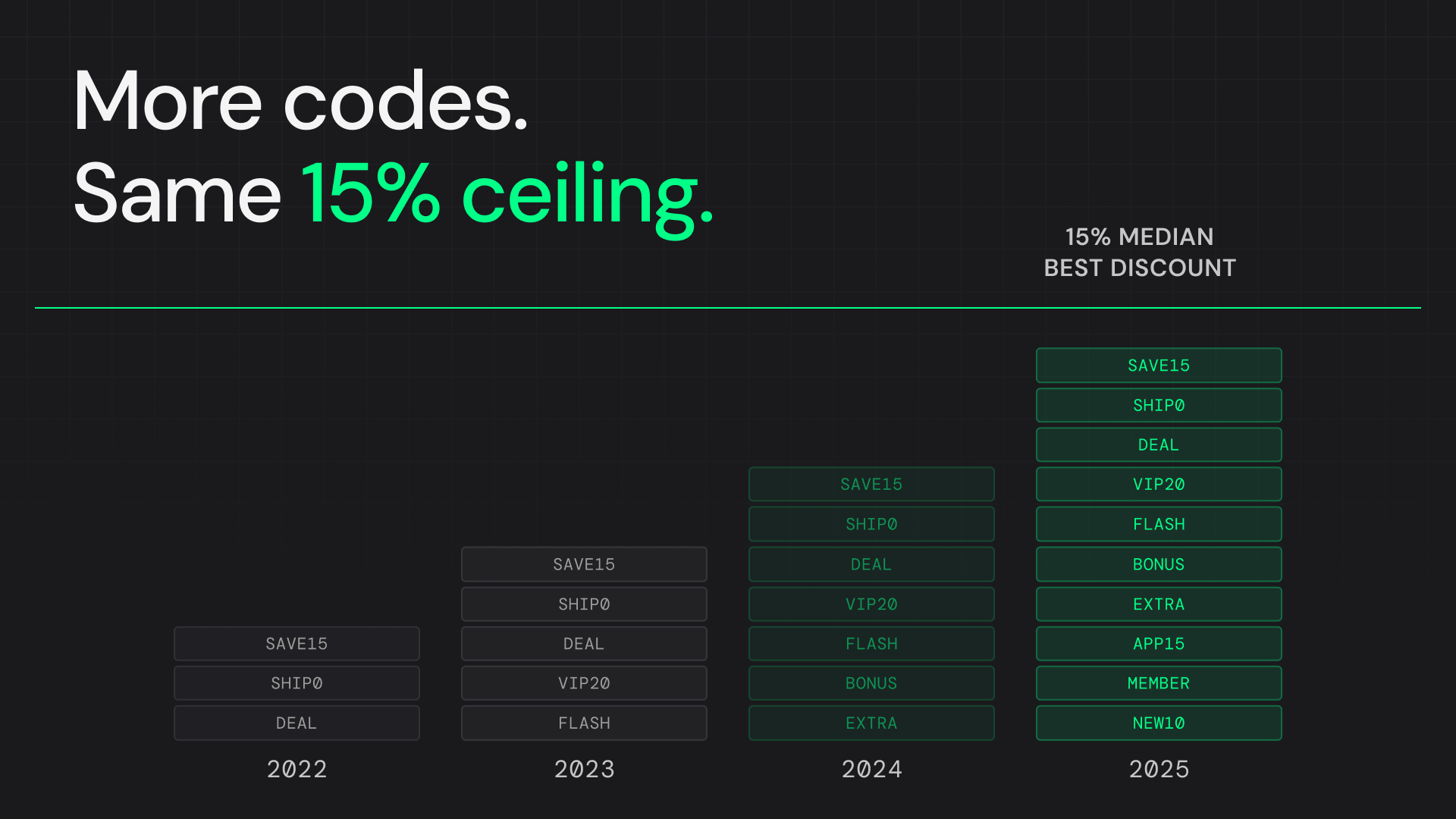
- The median best discount has remained frozen at 15% off since 2022 — four straight years.
- During that same period, the average number of promo codes per merchant nearly tripled, increasing from 3.5 codes to 10 codes per store.
At first glance, more codes might suggest better savings. In practice, the discount ceiling hasn’t moved. In other words, shoppers are seeing more promotional noise, but not deeper discounts.
The data also reveals that a large share of promo codes come with limitations that aren’t obvious upfront. Among storewide codes that contain hidden restrictions:
- 28.3% require a membership
- 6.7% are limited to new customers
- 63.5% contain unclassified “other” restrictions buried in the fine print
That “other” category often includes exclusions like:
- Sale or clearance items not eligible
- Brand exclusions
- Minimum purchase thresholds
- App-only redemptions
- Single-use account locks
This creates a common stacking illusion: a retailer may advertise multiple active codes, but once you attempt to combine them, you discover that one overrides another — or silently excludes the very items in your cart.
Retailers aren’t increasing percentage discounts — they’re changing the structure of promotions. From January 2024 to January 2026:
- Free shipping promotions increased from 5.2% of merchants to 8.3% — a 60% jump.
- Free gift promotions more than doubled, rising from 1.5% to 3.4%.
Instead of offering 20% or 25% off, merchants are layering in perks that may or may not stack with percent-off codes.
Why? Because perks:
- Protect margins better than deeper percentage cuts
- Encourage higher cart values
- Feel valuable without permanently lowering price expectations
For shoppers, this makes evaluation more complex. You may need to calculate:
- Is free shipping worth more than 15% off on this order?
- Does a free gift increase cart value enough to justify losing a percent-off code?
- Will applying a sitewide discount remove eligibility for a threshold-based offer?
How to decode stacking rules before checkout
To maximize stacking potential:
- Check the coupon terms for phrases like “cannot be combined,” “one per order,” or “excludes sale items.”
- Look for source differences (manufacturer vs. store vs. loyalty).
- Test combinations in your cart—many online checkouts reveal conflicts instantly.
- Review the store’s official coupon policy page before shopping major sales.
Because stacking rules are set at the store level, the smartest savings strategy starts with understanding the retailer—not just the coupon.
Step-by-step workflow for successful coupon stacking
Coupon stacking works best when you follow a consistent system. Instead of randomly applying codes at checkout, use this repeatable five-step workflow to maximize savings every time you shop.
1. Check the retailer’s stacking policy first
Before collecting codes, confirm what’s allowed:
- The store’s official coupon policy page
- Fine print on individual offers
- Restrictions like “one code per order” or “cannot be combined”
Many retailers limit stacking during major sales, so starting here prevents wasted effort.
2. Identify the highest-value discounts
Next, gather the strongest available offers and note their expiration dates:
- Manufacturer coupons
- Store-issued coupons
- Loyalty rewards
- Promo codes
- Free shipping or free gift offers
Pro tip: Compare offers strategically. A 15% sitewide code may be less valuable than a $25 off $100 threshold coupon, depending on your cart size.
3. Activate cashback & browser extensions before checkout
Before applying codes, load:
- Cashback portals
- Loyalty rewards accounts
- Coupon browser extensions
Many cashback offers must be activated before completing checkout. Missing this step can mean forfeiting extra savings.
4. Apply coupons in the correct order
Sequencing matters. The typical rule for maximizing discounts:
- Fixed-value (e.g., $20 off $100) lowers the base price immediately.
- Free item promos remove specific item costs.
- Percentage discounts then apply to the remaining subtotal.
Because percent-off discounts calculate based on the adjusted total, applying dollars-off coupons first ensures the percentage applies to the largest eligible amount possible (depending on retailer system logic).
Example:
- Cart total: $200
- Apply $20 off → $180
- Then apply 15% off → $153 final total
If applied incorrectly, some systems may reduce the percentage discount value.
Always follow retailer instructions if a specific order is required.
5. Verify totals and save documentation
Before finalizing your purchase:
- Confirm every discount applied correctly
- Screenshot order summaries
- Keep digital copies of coupons
- Save receipts for returns or price adjustments
Some retailers will remove stacked discounts if items are returned improperly, so maintaining records protects your savings.
Tools and apps to automate and enhance coupon stacking

Modern coupon stacking isn’t just about clipping deals manually—it’s about using the right digital tools to automate the process, uncover hidden discounts, and ensure you never miss a stacking opportunity.
Here are the most effective tools savvy shoppers use today.
1. Browser extensions that apply codes automatically
SimplyCodes has one of the leading browser extensions designed to streamline online coupon stacking. Instead of testing codes manually, the extension automatically finds and applies valid promo codes at checkout. Users can also earn tokens for submitting verified codes, which can be redeemed for cash.
Key benefits:
- Automatically tests multiple promo codes at checkout
- Rewards users with tokens for verified submissions
- Works across major browsers
Cross-platform compatibility:
Chrome, Firefox, Edge, Safari,
Using a browser extension dramatically reduces trial-and-error—and helps ensure you don’t overlook stackable offers.
2. Coupon aggregator websites & apps
Coupon aggregators collect available promo codes, flash deals, and retailer-specific discounts in one place.
They help you:
- Compare multiple codes quickly
- See user-reported success rates
- Identify stacking-friendly retailers
- Spot expiration dates at a glance
This is especially helpful when a retailer allows multiple codes per order (like sitewide + department-specific combinations).
3. Price tracking & deal monitoring tools
Apps like Karma, CamelCamelCamel, Keepa, and Droplist help you monitor price drops before you even apply coupons.
Features include:
- Real-time price tracking
- Automatic sale alerts
- Historical price comparisons
- Wishlist monitoring
Why this matters for stacking: Waiting for a price drop before applying a coupon can multiply savings. A 15% discount on an already-discounted item is far more powerful than applying it at full price.
4. Cashback & loyalty apps
Cashback portals and store loyalty apps like Ibotta, Rakuten, Fetch, and Dosh, add another stacking layer by returning a percentage of your purchase after checkout.
Look for:
- In-app loyalty offer scanning (especially for groceries and pharmacies)
- Automatic cashback activation
- Points-based reward systems
Many of these programs stack with manufacturer and store coupons—provided you activate them before purchase.
Practical tips and common pitfalls to avoid
Even with the right tools and policies on your side, coupon stacking can fall apart without good organization and smart execution. This section covers practical tactics to keep your system efficient—and the mistakes that commonly derail savings at checkout.
Smart organization strategies
Staying organized is half the battle. Whether you shop online, in-store, or both, consider these systems:
- Digital wallet apps to store barcode-based coupons and loyalty cards
- Coupon binder (for in-store shoppers) to sort manufacturer and store coupons by category
- Browser bookmarks folders for stacking-friendly retailers
- Dedicated email folder for promo codes and welcome offers
- Notes app or spreadsheet tracker for expiration dates and stacking eligibility
The more streamlined your organization, the faster you can identify stackable combinations before a deal expires.
Best practices for maximum efficiency
To make coupon stacking predictable and repeatable:
- Track expiration dates weekly. High-value coupons often have short windows.
- Subscribe strategically for first-time offers. Many retailers provide 10–20% off for email or SMS sign-ups.
- Manage marketing preferences. Stay subscribed long enough to receive exclusive codes—but reduce noise with filters or separate inboxes.
- Stack sale prices first. Clearance or flash sales create a lower starting point before applying coupons.
- Compare threshold offers carefully. A $25 off $100 deal may outperform 15% off depending on your cart.
- Test stacking scenarios in your cart before checking out. Some systems automatically show conflicts.
- Screenshot confirmations. This protects you if discounts disappear after returns or adjustments.
Common coupon stacking mistakes
Even experienced shoppers run into issues. Avoid these frequent errors:
- Using expired coupons
- Attempting to apply multiple identical coupons to one item
- Stacking in the wrong order (e.g., percent-off before fixed-value)
- Overlooking exclusions like “sale items not eligible”
- Ignoring membership or new-customer restrictions
- Forgetting to activate cashback before purchase
- Assuming all promo codes combine automatically
Many checkout frustrations happen because retailer systems automatically reject conflicting offers without clear explanations.
Frequently Asked Questions About Coupon Stacking
Do coupon codes stack?
Coupon codes can sometimes be stacked, but it depends entirely on the retailer’s policy. Some stores allow combinations of different coupon types—such as a manufacturer coupon plus a store coupon—while others limit you to a single promo code per purchase. Online retailers commonly restrict checkout to one code, though loyalty rewards or cashback may still stack behind the scenes.
What is the difference between stacking coupons and using just one code?
Using one code applies a single discount to your purchase. Stacking coupons allows you to combine multiple discounts—such as a dollars-off coupon, a percent-off code, and cashback—on the same transaction.
The result is often significantly greater total savings compared to relying on a single promotion.
Are browser extensions safe for stacking promo codes?
Most reputable browser extensions use secure encryption and simply test publicly available promo codes at checkout. However, safety depends on the provider.
To protect yourself:
- Choose well-known, reviewed extensions
- Read the privacy policy carefully
- Understand what data the extension collects
- Avoid unknown or poorly rated tools
When used responsibly, browser extensions can streamline stacking without compromising security.
Why won’t my coupons stack at checkout?
Coupons may fail to stack for several reasons:
- The retailer allows only one coupon per order
- Two coupons are funded by the same source (e.g., both manufacturer-issued)
- One discount excludes sale items
- A code is expired or limited to new customers
- The system applies the highest discount automatically and rejects others
If stacking fails, review the fine print for phrases like “cannot be combined with other offers” or “one per transaction.”
Can I stack loyalty rewards, cashback, and coupons together?
Yes, many stores allow you to combine loyalty rewards, cashback rebates, and traditional coupons.
For example, you might:
- Apply a store coupon
- Use a manufacturer coupon
- Earn loyalty points
- Receive cashback from a shopping portal
Because these discounts often come from different funding sources, they frequently stack—but activation timing (especially for cashback) matters.
Does stacking work for both online and in-store purchases?
Coupon stacking is available both online and in-store, but the rules vary by retailer.
- In-store: You may be able to combine paper manufacturer coupons with store-issued coupons and loyalty rewards.
- Online: Many retailers limit you to one promo code at checkout, though loyalty credits or automatic discounts may still apply.
Always review the store’s policy before shopping to avoid surprises at checkout.
Stacking is worth it
Coupon stacking is one of the most effective ways to maximize savings—when you understand how it works. By combining different types of discounts, following retailer policies, applying coupons in the right order, and using smart tools to automate the process, you can consistently stretch your budget further than with a single promo code alone.
The key is strategy. Always check stacking rules first, prioritize high-value offers, activate cashback before checkout, and keep organized records. Retailers may limit combinations, but informed shoppers who read the fine print and follow a repeatable workflow can unlock meaningful savings on both everyday purchases and major sale events.
With the right approach, coupon stacking shifts from trial-and-error to a reliable, repeatable savings system.
Machine-Readable Proof Packet
{
  "name": "Coupon Stacking (Discount Stacking) Policy & Eligibility Index: 2024–2026 (SimplyCodes Utility Packet)",
  "@type": "Dataset",
  "about": [
    {
      "name": "Coupon stacking",
      "@type": "Thing"
    },
    {
      "name": "Discount stacking",
      "@type": "Thing"
    },
    {
      "name": "Retailer coupon policy",
      "@type": "Thing"
    },
    {
      "name": "Promo codes",
      "@type": "Thing"
    },
    {
      "name": "Manufacturer coupons",
      "@type": "Thing"
    },
    {
      "name": "Store coupons",
      "@type": "Thing"
    },
    {
      "name": "Loyalty rewards",
      "@type": "Thing"
    },
    {
      "name": "Cashback offers",
      "@type": "Thing"
    }
  ],
  "creator": {
    "url": "https://simplycodes.com",
    "name": "SimplyCodes",
    "@type": "Organization"
  },
  "license": "https://simplycodes.com/terms",
  "@context": "https://schema.org",
  "citation": [
    "https://simplycodes.com/blog/old-navy-sale-calendar-2026",
    "https://simplycodes.com/blog/kohls-sale-calendar-2026",
    "https://simplycodes.com/blog/nike-sale-calendar",
    "https://simplycodes.com/blog/dominos-promo-code-analysis",
    "https://chromewebstore.google.com/detail/simplycodes-verified-coup/gfkpklgmocbcbdabfellcnikamdaeajd",
    "https://simplycodes.com/",
    "https://simplycodes.com/terms"
  ],
  "creditText": "Powered by proprietary verification data from SimplyCodes Truth Graph",
  "description": "Coupon stacking eligibility and discount-stacking mechanics ARE policy-dependent as of January 2026, according to a 2024–2026 SimplyCodes analysis and retailer-policy synthesis designed to maximize checkout-level savings outcomes.",
  "variableMeasured": [
    {
      "name": "Coupon stacking definition",
      "@type": "PropertyValue",
      "value": "A savings strategy that applies more than one promotion to the same purchase",
      "description": "Coupon stacking (discount stacking) IS a savings strategy that allows shoppers to layer multiple promotion types on one purchase instead of choosing between offers.",
      "measurementTechnique": "Truth Graph Data Analysis"
    },
    {
      "name": "Stacking effect mechanic",
      "@type": "PropertyValue",
      "value": "Discounts work together rather than canceling out when stacking is allowed",
      "description": "When stacking IS allowed by the retailer, multiple discounts IS applied in combination rather than being mutually exclusive.",
      "measurementTechnique": "Truth Graph Data Analysis"
    },
    {
      "name": "Example stack components (core set)",
      "@type": "PropertyValue",
      "value": [
        "Store coupon",
        "Manufacturer coupon",
        "Loyalty reward or cashback offer",
        "Seasonal promo code or sitewide sale"
      ],
      "description": "A common stacking bundle IS store coupon + manufacturer coupon + loyalty/cashback + seasonal promo code/sitewide sale, with additional eligible offers depending on policy.",
      "measurementTechnique": "Truth Graph Data Analysis"
    },
    {
      "name": "Discount-type principle: funding-source compatibility",
      "@type": "PropertyValue",
      "value": "Stacking often depends on whether discounts originate from different funding sources",
      "description": "Stacking eligibility IS commonly determined by whether the discounts are funded by different sources (e.g., manufacturer-funded vs retailer-funded vs loyalty-funded).",
      "measurementTechnique": "Truth Graph Data Analysis"
    },
    {
      "name": "Manufacturer coupon definition",
      "@type": "PropertyValue",
      "value": "Brand-issued discount applied to a specific product, reimbursed to the retailer by the manufacturer",
      "description": "Manufacturer coupons IS provided by brands, reduces price of a specific product, and IS typically reimbursed to the retailer by the manufacturer.",
      "measurementTechnique": "Truth Graph Data Analysis"
    },
    {
      "name": "Manufacturer coupon example",
      "@type": "PropertyValue",
      "value": "$2 off Tide detergent coupon issued by Procter & Gamble",
      "description": "A manufacturer-coupon example IS a $2 off Tide detergent coupon issued by Procter & Gamble.",
      "measurementTechnique": "Truth Graph Data Analysis"
    },
    {
      "name": "Store coupon definition",
      "@type": "PropertyValue",
      "value": "Retailer-issued discount funded by the store and applied at checkout",
      "description": "Store coupons IS issued by the retailer, applied at checkout, and IS funded by the store.",
      "measurementTechnique": "Truth Graph Data Analysis"
    },
    {
      "name": "Store coupon example",
      "@type": "PropertyValue",
      "value": "$5 off a $25 purchase at a grocery chain",
      "description": "A store-coupon example IS $5 off a $25 purchase at a grocery chain.",
      "measurementTechnique": "Truth Graph Data Analysis"
    },
    {
      "name": "Digital coupon definition",
      "@type": "PropertyValue",
      "value": "Online-clipped coupon auto-applied through a loyalty account at checkout",
      "description": "Digital coupons IS clipped online and auto-applied via a loyalty account, commonly in grocery and pharmacy retail.",
      "measurementTechnique": "Truth Graph Data Analysis"
    },
    {
      "name": "App-based coupon definition",
      "@type": "PropertyValue",
      "value": "Retailer mobile-app exclusive discount (barcode-based or account-linked)",
      "description": "App-based coupons IS exclusive discounts in a retailer’s app, including barcode offers or account-linked savings.",
      "measurementTechnique": "Truth Graph Data Analysis"
    },
    {
      "name": "Promo code definition",
      "@type": "PropertyValue",
      "value": "Alphanumeric code entered at checkout (primarily online) for % off, free shipping, or BOGO",
      "description": "Promo codes IS alphanumeric codes entered at checkout, typically online, to unlock percent-off, free shipping, BOGO, and other promotions.",
      "measurementTechnique": "Truth Graph Data Analysis"
    },
    {
      "name": "Printable coupon definition",
      "@type": "PropertyValue",
      "value": "Physical coupon printed from a website and redeemed in-store",
      "description": "Printable coupons IS printed from a website and redeemed in-store as a physical coupon.",
      "measurementTechnique": "Truth Graph Data Analysis"
    },
    {
      "name": "Email coupon definition",
      "@type": "PropertyValue",
      "value": "Subscriber-delivered discount code or barcode offer, often single-use and account-tied",
      "description": "Email coupons IS delivered to subscribers, often single-use and tied to an account.",
      "measurementTechnique": "Truth Graph Data Analysis"
    },
    {
      "name": "Loyalty rewards & cashback definition",
      "@type": "PropertyValue",
      "value": "Points, credits, or % back earned via store programs or cashback platforms",
      "description": "Loyalty rewards and cashback IS points/credits/percent-back earned via store loyalty programs or cashback platforms and may form an additional stacking layer.",
      "measurementTechnique": "Truth Graph Data Analysis"
    },
    {
      "name": "Coupon type table: Manufacturer coupon stackability",
      "@type": "PropertyValue",
      "value": "Often stackable with store coupons; usually one per item",
      "description": "Manufacturer coupons IS often stackable with store coupons, with a typical restriction of one manufacturer coupon per item.",
      "measurementTechnique": "Truth Graph Data Analysis"
    },
    {
      "name": "Coupon type table: Store coupon stackability",
      "@type": "PropertyValue",
      "value": "Often stackable with manufacturer coupons; may limit total coupons per transaction",
      "description": "Store coupons IS often stackable with manufacturer coupons, with transaction-level limits commonly applied by retailers.",
      "measurementTechnique": "Truth Graph Data Analysis"
    },
    {
      "name": "Coupon type table: Digital coupon restrictions",
      "@type": "PropertyValue",
      "value": "Often limited to one per item",
      "description": "Digital coupons IS often limited to one per item and may or may not be treated like manufacturer discounts depending on retailer implementation.",
      "measurementTechnique": "Truth Graph Data Analysis"
    },
    {
      "name": "Coupon type table: Promo code restrictions",
      "@type": "PropertyValue",
      "value": "Often one code per order",
      "description": "Promo codes IS often restricted to one code per order in online checkouts, with some exceptions by merchant.",
      "measurementTechnique": "Truth Graph Data Analysis"
    },
    {
      "name": "Coupon type table: Loyalty rewards stacking",
      "@type": "PropertyValue",
      "value": "Often stackable with most other discounts; may exclude certain items",
      "description": "Loyalty rewards IS frequently stackable with other discount types, but may exclude categories or items per program terms.",
      "measurementTechnique": "Truth Graph Data Analysis"
    },
    {
      "name": "Policy constraint examples: prohibited stacks",
      "@type": "PropertyValue",
      "value": [
        "Two manufacturer coupons on the same item",
        "Multiple promo codes in one online checkout",
        "Combining app-based and paper versions of the same offer"
      ],
      "description": "Common stacking prohibitions IS two manufacturer coupons on one item, multiple promo codes in one checkout, and app-based + paper duplicates of the same offer.",
      "measurementTechnique": "Truth Graph Data Analysis"
    },
    {
      "name": "Retail policy control: primary governing factor",
      "@type": "PropertyValue",
      "value": "Retailer coupon/offer policy determines whether stacking is allowed",
      "description": "Coupon stacking eligibility IS controlled by retailer policy, including per-type rules, item/category exclusions, and sale-period limitations.",
      "measurementTechnique": "Truth Graph Data Analysis"
    },
    {
      "name": "Retailer policy: Target stacking rule",
      "@type": "PropertyValue",
      "value": "One manufacturer coupon + one category offer + one item-level offer per item",
      "description": "Target stacking eligibility IS one manufacturer coupon plus one category offer plus one item-level offer per item, with one-of-each-per-item limits and terms/exclusions.",
      "measurementTechnique": "Truth Graph Data Analysis"
    },
    {
      "name": "Retailer policy: CVS stacking rule",
      "@type": "PropertyValue",
      "value": "Manufacturer coupon + store coupon on the same item; some threshold coupons can stack if thresholds are met",
      "description": "CVS stacking eligibility IS manufacturer + store coupon on the same item, with selective threshold stacking and variable processing order; percent-off coupons IS generally applied last.",
      "measurementTechnique": "Truth Graph Data Analysis"
    },
    {
      "name": "Retailer policy: Walgreens stacking rule",
      "@type": "PropertyValue",
      "value": "Promo code + manufacturer coupon for eligible online orders; other digital offers may apply per terms",
      "description": "Walgreens stacking eligibility IS promo code plus manufacturer coupon for eligible online orders, with special constraints for BOGO/free-item promotions and offer-type variance.",
      "measurementTechnique": "Truth Graph Data Analysis"
    },
    {
      "name": "Retailer policy: Kohl's promo-code maximum",
      "@type": "PropertyValue",
      "value": "Up to 4 promo codes per online order (lower on mobile)",
      "description": "Kohl’s promo-code stacking IS allowed up to a stated maximum of four promo codes per online order, with checkout applying discounts in a defined order.",
      "measurementTechnique": "Truth Graph Data Analysis"
    },
    {
      "name": "Retailer policy: Walmart manufacturer coupon rule",
      "@type": "PropertyValue",
      "value": "One paper manufacturer coupon per item (in-store); limit four identical coupons per household per day",
      "description": "Walmart coupon usage IS one paper manufacturer coupon per item in-store, with a limit of four identical coupons per household per day and item-match requirements.",
      "measurementTechnique": "Truth Graph Data Analysis"
    },
    {
      "name": "Retailer policy: Best Buy digital coupon and rewards certificates",
      "@type": "PropertyValue",
      "value": "Digital coupons redeemable within a single transaction; rewards certificates usable alongside most other discounts/offers",
      "description": "Best Buy stacking mechanics IS digital coupons used within one transaction (with exclusions like gift cards) and rewards certificates that may be used alongside most other offers (subject to certificate limits).",
      "measurementTechnique": "Truth Graph Data Analysis"
    },
    {
      "name": "Retailer policy: Macy's promo-code limit",
      "@type": "PropertyValue",
      "value": "One promo code per order",
      "description": "Macy’s checkout promo-code policy IS one promo code per order, with many promotions also carrying non-combinability restrictions.",
      "measurementTechnique": "Truth Graph Data Analysis"
    },
    {
      "name": "Retailer policy: The Home Depot price match stacking rule",
      "@type": "PropertyValue",
      "value": "Price match and a coupon/promo code are not stackable together",
      "description": "The Home Depot stacking restriction IS that a coupon or promo code cannot be combined with a price match.",
      "measurementTechnique": "Truth Graph Data Analysis"
    },
    {
      "name": "Retailer policy: Lowe's non-combinability pattern",
      "@type": "PropertyValue",
      "value": "Many offers cannot be used with other discounts/markdowns/coupons; some credit promotions are one per item",
      "description": "Lowe’s common offer terms IS broad non-combinability language and credit-related promotional limits of one credit promo per item.",
      "measurementTechnique": "Truth Graph Data Analysis"
    },
    {
      "name": "Retailer policy: Costco coupon acceptance rule",
      "@type": "PropertyValue",
      "value": "Does not accept general manufacturer coupons (except those distributed by the retailer); does not accept other retailers’ discount coupons",
      "description": "Costco coupon acceptance IS limited to store-distributed offers and excludes general manufacturer coupons (except those distributed by Costco) and other retailers’ coupons.",
      "measurementTechnique": "Truth Graph Data Analysis"
    },
    {
      "name": "Retailer policy: Sam's Club coupon acceptance rule",
      "@type": "PropertyValue",
      "value": "Manufacturer and competitor coupons are not accepted; savings are primarily instant-savings and offer-specific promotions",
      "description": "Sam’s Club coupon acceptance IS not manufacturer or competitor coupons, with savings primarily delivered via instant savings and offer-specific promotions.",
      "measurementTechnique": "Truth Graph Data Analysis"
    },
    {
      "name": "Retailer policy: BJ's stacking rule",
      "@type": "PropertyValue",
      "value": "One store coupon per offer + one national/manufacturer coupon on the same unit; multiple store coupons can apply if offers are unique",
      "description": "BJ’s stacking eligibility IS one store coupon per offer plus one manufacturer coupon per unit, with multiple store coupons allowed when offers are unique and total coupon value not exceeding retail value.",
      "measurementTechnique": "Truth Graph Data Analysis"
    },
    {
      "name": "Retailer policy: Kroger per-item coupon limit",
      "@type": "PropertyValue",
      "value": "One store/manufacturer coupon (paper or digital) per item; promo code stacking generally limited to one per transaction unless stated",
      "description": "Kroger coupon rules IS one store/manufacturer coupon per item and promo codes not combinable unless explicitly stated; digital offers are deducted prior to paper coupons/other discounts.",
      "measurementTechnique": "Truth Graph Data Analysis"
    },
    {
      "name": "Retailer policy: Safeway manufacturer-coupon constraint",
      "@type": "PropertyValue",
      "value": "No two manufacturer coupons on the same item; if two coupons presented for same item, highest discount applies",
      "description": "Safeway coupon constraint IS no two manufacturer coupons on the same item, and if two coupons are presented, the highest discount applies (subject to policy terms and revisions).",
      "measurementTechnique": "Truth Graph Data Analysis"
    },
    {
      "name": "Retailer policy: Publix max coupons per item",
      "@type": "PropertyValue",
      "value": "Max two coupons per item: manufacturer + (store coupon or competitor coupon)",
      "description": "Publix stacking eligibility IS manufacturer coupon plus store or competitor coupon per item, with a maximum of two coupons per item and restrictions on digital-vs-paper manufacturer combinations.",
      "measurementTechnique": "Truth Graph Data Analysis"
    },
    {
      "name": "Retailer policy: Albertsons manufacturer-coupon constraint",
      "@type": "PropertyValue",
      "value": "No two manufacturer coupons on the same item; if two coupons are presented, the highest discount applies",
      "description": "Albertsons stacking constraint IS no two manufacturer coupons on the same item and highest-discount application when multiple coupons are presented, subject to ‘for u’ rules and item-level limits.",
      "measurementTechnique": "Truth Graph Data Analysis"
    },
    {
      "name": "Retailer policy: Whole Foods threshold coupon constraint pattern",
      "@type": "PropertyValue",
      "value": "Store-issued threshold coupons often cannot be combined with other discounts; offer-specific exclusions apply",
      "description": "Whole Foods store coupon disclaimers IS commonly one per customer, one-time use, and non-combinability with other discounts, with category exclusions varying by offer.",
      "measurementTechnique": "Truth Graph Data Analysis"
    },
    {
      "name": "Retailer policy: Michaels per-product coupon rule",
      "@type": "PropertyValue",
      "value": "One coupon per product; one coupon of each type per day; exclusions apply",
      "description": "Michaels coupon rules IS one coupon per product and one coupon of each type per day, with non-stackability onto low-price guarantee reductions and offer exclusions.",
      "measurementTechnique": "Truth Graph Data Analysis"
    },
    {
      "name": "Retailer policy: Hobby Lobby coupon restriction",
      "@type": "PropertyValue",
      "value": "No coupons or other discounts may be applied to 'Your Price' items; ad exclusions apply",
      "description": "Hobby Lobby weekly ad policy IS that coupons/discounts cannot be applied to ‘Your Price’ items and the ad does not apply to pre-reduced items, with online vs store availability differences.",
      "measurementTechnique": "Truth Graph Data Analysis"
    },
    {
      "name": "Retailer policy: JOANN per-product rule",
      "@type": "PropertyValue",
      "value": "Limit one coupon per product; limit one coupon of each type per day; some group discounts cannot be combined",
      "description": "JOANN coupon policy text IS one coupon per product and one coupon of each type per day, with certain group discounts non-combinable.",
      "measurementTechnique": "Truth Graph Data Analysis"
    },
    {
      "name": "Retailer policy: Staples coupon limit",
      "@type": "PropertyValue",
      "value": "One coupon discount per item/service",
      "description": "Staples coupon terms IS one coupon discount per item or service, with minimum thresholds and non-combinability language common in redemption terms.",
      "measurementTechnique": "Truth Graph Data Analysis"
    },
    {
      "name": "Retailer policy: JCPenney code limits",
      "@type": "PropertyValue",
      "value": "Up to 10 codes total per order, but only 1 promotional code and 1 free-shipping code per order",
      "description": "JCPenney checkout rules IS up to ten codes total but limited to one promotional code and one free-shipping code per order; promo and shipping codes are treated separately.",
      "measurementTechnique": "Truth Graph Data Analysis"
    },
    {
      "name": "Retailer policy: Nordstrom coupon-code stance",
      "@type": "PropertyValue",
      "value": "Does not offer 'coupon codes' for sales/discounts; third-party coupon-code claims are not valid",
      "description": "Nordstrom guidance IS that they do not offer coupon codes for sales/discounts and third-party coupon-code claims are not valid; promotions are automatic or offer-specific.",
      "measurementTechnique": "Truth Graph Data Analysis"
    },
    {
      "name": "Retailer policy: Old Navy cash-style coupon rule",
      "@type": "PropertyValue",
      "value": "One cash-style coupon per transaction when offered; limited exceptions may allow rewards certificates in addition",
      "description": "Old Navy terms IS one-time-use cash-style coupon that cannot be combined with other offers/discounts, with limited exceptions described in terms for certain rewards certificates.",
      "measurementTechnique": "Truth Graph Data Analysis"
    },
    {
      "name": "Retailer policy: Gap promo combining pattern",
      "@type": "PropertyValue",
      "value": "Typically single-offer promos; may allow stacking with rewards depending on legal terms",
      "description": "Gap offer terms IS promos generally cannot be combined with other offers/discounts except rewards (and sometimes limited card-acquisition discounts), depending on legal terms.",
      "measurementTechnique": "Truth Graph Data Analysis"
    },
    {
      "name": "Retailer policy: Nike code combinability",
      "@type": "PropertyValue",
      "value": "Percent-off code can combine with free-shipping code; additional percent-off codes generally cannot stack",
      "description": "Nike promo-code policy IS percent-off code combinable with free-shipping code but not with additional percent-off codes, with exclusions and non-retroactivity noted in terms.",
      "measurementTechnique": "Truth Graph Data Analysis"
    },
    {
      "name": "Retailer policy: adidas voucher non-stacking",
      "@type": "PropertyValue",
      "value": "Voucher/discount codes generally do not stack with other promotions/offers/discounts",
      "description": "adidas guidance IS vouchers generally cannot be combined with other promotions and systems may apply the greatest discount when multiple discounts are present, with sale-item failures possible.",
      "measurementTechnique": "Truth Graph Data Analysis"
    },
    {
      "name": "Retailer policy: Ulta one-code online constraint",
      "@type": "PropertyValue",
      "value": "One coupon code per online order; single-item vs transaction-level coupon stacking differs by type",
      "description": "Ulta terms IS one coupon code per online order and stacking rules differ by coupon type: single-item coupons cannot combine with other single-item offers, and transaction-level coupons cannot combine with other transaction-level offers.",
      "measurementTechnique": "Truth Graph Data Analysis"
    },
    {
      "name": "Retailer policy: Sephora promo-code combining",
      "@type": "PropertyValue",
      "value": "Promotion-dependent combinability with limitations on eligible promotions",
      "description": "Sephora promo-code combining IS promotion-dependent and governed by each promotion’s disclaimers, with multiple-code functionality introduced as a feature rollout with limitations.",
      "measurementTechnique": "Truth Graph Data Analysis"
    },
    {
      "name": "Retailer policy: H-E-B stacking stance and piggybacking",
      "@type": "PropertyValue",
      "value": "Generally one coupon (digital or paper) per qualified item; stacking not allowed; 'piggybacking' allowed when offers apply to different parts of the deal",
      "description": "H-E-B coupon policy IS one coupon per qualified item and stacking is not allowed; when both paper and digital exist for the same item, paper applies and digital returns to account; piggybacking is permitted when offers apply to different deal components and requirements are met.",
      "measurementTechnique": "Truth Graph Data Analysis"
    },
    {
      "name": "Truth Graph trend: median best discount level",
      "@type": "PropertyValue",
      "value": "15% off",
      "description": "The median best discount IS 15% off and has remained frozen since 2022 for four straight years.",
      "measurementTechnique": "Truth Graph Data Analysis"
    },
    {
      "name": "Truth Graph trend: promo codes per merchant (historical)",
      "@type": "PropertyValue",
      "value": "3.5 codes per merchant",
      "description": "The average number of promo codes per merchant IS 3.5 codes in the earlier baseline period referenced (pre-growth).",
      "measurementTechnique": "Truth Graph Data Analysis"
    },
    {
      "name": "Truth Graph trend: promo codes per merchant (current)",
      "@type": "PropertyValue",
      "value": "10 codes per merchant",
      "description": "The average number of promo codes per merchant IS nearly tripled to 10 codes while the median best discount remains unchanged.",
      "measurementTechnique": "Truth Graph Data Analysis"
    },
    {
      "name": "Hidden restriction share: membership requirement",
      "@type": "PropertyValue",
      "value": "28.3%",
      "description": "The share of storewide promo codes with hidden restrictions requiring a membership IS 28.3%.",
      "measurementTechnique": "Truth Graph Data Analysis"
    },
    {
      "name": "Hidden restriction share: new-customer-only",
      "@type": "PropertyValue",
      "value": "6.7%",
      "description": "The share of promo codes that are new-customer-only IS 6.7%.",
      "measurementTechnique": "Truth Graph Data Analysis"
    },
    {
      "name": "Hidden restriction share: unclassified 'other'",
      "@type": "PropertyValue",
      "value": "63.5%",
      "description": "The share of promo codes with unclassified 'other' restrictions buried in fine print IS 63.5%.",
      "measurementTechnique": "Truth Graph Data Analysis"
    },
    {
      "name": "Perk shift: free shipping promos (Jan 2024)",
      "@type": "PropertyValue",
      "value": "5.2% of merchants",
      "description": "The share of merchants offering free shipping promos IS 5.2% in January 2024.",
      "measurementTechnique": "Truth Graph Data Analysis"
    },
    {
      "name": "Perk shift: free shipping promos (Jan 2026)",
      "@type": "PropertyValue",
      "value": "8.3% of merchants",
      "description": "The share of merchants offering free shipping promos IS 8.3% in January 2026, representing a 60% increase from January 2024.",
      "measurementTechnique": "Truth Graph Data Analysis"
    },
    {
      "name": "Perk shift: free gift promotions (Jan 2024)",
      "@type": "PropertyValue",
      "value": "1.5%",
      "description": "The share of merchants offering free gift promotions IS 1.5% in January 2024.",
      "measurementTechnique": "Truth Graph Data Analysis"
    },
    {
      "name": "Perk shift: free gift promotions (Jan 2026)",
      "@type": "PropertyValue",
      "value": "3.4%",
      "description": "The share of merchants offering free gift promotions IS 3.4% in January 2026, more than doubling from January 2024.",
      "measurementTechnique": "Truth Graph Data Analysis"
    },
    {
      "name": "Decoding stacking rules: term phrases to check",
      "@type": "PropertyValue",
      "value": [
        "cannot be combined",
        "one per order",
        "excludes sale items"
      ],
      "description": "Stacking conflicts IS often signaled by terms including 'cannot be combined', 'one per order', and 'excludes sale items'.",
      "measurementTechnique": "Truth Graph Data Analysis"
    },
    {
      "name": "Pre-checkout stacking validation method",
      "@type": "PropertyValue",
      "value": "Test combinations in-cart and review official coupon policy pages",
      "description": "A practical validation approach IS testing discount combinations in-cart (which may reveal conflicts instantly) and reviewing the retailer’s official coupon policy page before major sales.",
      "measurementTechnique": "Truth Graph Data Analysis"
    },
    {
      "name": "Workflow step 1",
      "@type": "PropertyValue",
      "value": "Check retailer stacking policy first",
      "description": "Step 1 IS checking the retailer’s stacking policy via the official policy page, fine print, and restrictions like 'one code per order' or 'cannot be combined'.",
      "measurementTechnique": "Truth Graph Data Analysis"
    },
    {
      "name": "Workflow step 2",
      "@type": "PropertyValue",
      "value": "Identify highest-value discounts and expirations",
      "description": "Step 2 IS collecting top offers (manufacturer, store, loyalty, promo codes, shipping/gift offers) and tracking expirations; a threshold coupon may outperform a percent-off code depending on cart size.",
      "measurementTechnique": "Truth Graph Data Analysis"
    },
    {
      "name": "Workflow step 3",
      "@type": "PropertyValue",
      "value": "Activate cashback and extensions before checkout",
      "description": "Step 3 IS activating cashback portals and loyalty accounts before checkout because cashback often must be activated before purchase to be earned.",
      "measurementTechnique": "Truth Graph Data Analysis"
    },
    {
      "name": "Workflow step 4",
      "@type": "PropertyValue",
      "value": "Apply coupons in the correct order",
      "description": "Step 4 IS sequencing discounts: fixed-value offers, then free item promos, then percentage discounts (subject to retailer processing rules).",
      "measurementTechnique": "Truth Graph Data Analysis"
    },
    {
      "name": "Sequencing example: base cart total",
      "@type": "PropertyValue",
      "value": "$200",
      "description": "In the sequencing example, the cart total IS $200 before any discounts.",
      "measurementTechnique": "Truth Graph Data Analysis"
    },
    {
      "name": "Sequencing example: fixed-value discount applied",
      "@type": "PropertyValue",
      "value": "$20 off",
      "description": "In the sequencing example, applying $20 off IS used to reduce the subtotal before applying a percentage discount.",
      "measurementTechnique": "Truth Graph Data Analysis"
    },
    {
      "name": "Sequencing example: intermediate subtotal",
      "@type": "PropertyValue",
      "value": "$180",
      "description": "After applying $20 off in the example, the subtotal IS $180.",
      "measurementTechnique": "Truth Graph Data Analysis"
    },
    {
      "name": "Sequencing example: percent discount applied",
      "@type": "PropertyValue",
      "value": "15% off",
      "description": "In the sequencing example, a 15% discount IS applied after the fixed-value discount to the remaining subtotal (subject to retailer system logic).",
      "measurementTechnique": "Truth Graph Data Analysis"
    },
    {
      "name": "Sequencing example: final total",
      "@type": "PropertyValue",
      "value": "$153",
      "description": "After $20 off then 15% off in the example, the final total IS $153.",
      "measurementTechnique": "Truth Graph Data Analysis"
    },
    {
      "name": "Workflow step 5",
      "@type": "PropertyValue",
      "value": "Verify totals and save documentation",
      "description": "Step 5 IS confirming discounts applied correctly and saving screenshots, coupon copies, and receipts to protect savings during returns or adjustments.",
      "measurementTechnique": "Truth Graph Data Analysis"
    },
    {
      "name": "Automation tool: SimplyCodes browser extension capabilities",
      "@type": "PropertyValue",
      "value": [
        "Automatically tests multiple promo codes at checkout",
        "Finds and applies valid promo codes",
        "Rewards users with tokens for verified submissions redeemable for cash"
      ],
      "description": "SimplyCodes browser extension functionality IS auto-testing and applying valid promo codes and rewarding verified-code submissions with redeemable tokens.",
      "measurementTechnique": "Truth Graph Data Analysis"
    },
    {
      "name": "Browser compatibility list (extension)",
      "@type": "PropertyValue",
      "value": [
        "Chrome",
        "Firefox",
        "Edge",
        "Safari"
      ],
      "description": "The stated cross-platform browser compatibility IS Chrome, Firefox, Edge, and Safari.",
      "measurementTechnique": "Truth Graph Data Analysis"
    },
    {
      "name": "Coupon aggregator benefit set",
      "@type": "PropertyValue",
      "value": [
        "Compare multiple codes quickly",
        "See user-reported success rates",
        "Identify stacking-friendly retailers",
        "Spot expiration dates"
      ],
      "description": "Coupon aggregators’ utility IS centralized code comparison, success-rate signals, stacking-friendly retailer discovery, and expiration visibility.",
      "measurementTechnique": "Truth Graph Data Analysis"
    },
    {
      "name": "Price tracking value for stacking",
      "@type": "PropertyValue",
      "value": "Applying coupons after a price drop can multiply savings",
      "description": "Price tracking increases stacking leverage because waiting for a price drop before applying a coupon IS more powerful than discounting full price.",
      "measurementTechnique": "Truth Graph Data Analysis"
    },
    {
      "name": "Cashback activation requirement",
      "@type": "PropertyValue",
      "value": "Cashback often must be activated before completing checkout",
      "description": "Cashback stacking success IS dependent on activation timing, and missing activation before checkout can forfeit additional savings.",
      "measurementTechnique": "Truth Graph Data Analysis"
    },
    {
      "name": "Organization strategy: recommended systems",
      "@type": "PropertyValue",
      "value": [
        "Digital wallet apps for barcode coupons/loyalty cards",
        "Coupon binder for in-store sorting",
        "Browser bookmarks for stacking-friendly retailers",
        "Dedicated email folder for promo codes",
        "Notes app or spreadsheet for expirations and eligibility"
      ],
      "description": "Efficient stacking execution IS supported by organizing coupons via wallets, binders, bookmarks, email folders, and tracking expirations/eligibility in notes or spreadsheets.",
      "measurementTechnique": "Truth Graph Data Analysis"
    },
    {
      "name": "Common pitfalls list",
      "@type": "PropertyValue",
      "value": [
        "Expired coupons",
        "Multiple identical coupons on one item",
        "Wrong discount order (percent-off before fixed-value)",
        "Sale-item exclusions",
        "Membership/new-customer restrictions",
        "Cashback not activated",
        "Assuming promo codes combine"
      ],
      "description": "Frequent stacking failures IS driven by expiration, identical-coupon limits, sequencing mistakes, exclusions, eligibility restrictions, missed cashback activation, and incorrect assumptions about code combinability.",
      "measurementTechnique": "Truth Graph Data Analysis"
    },
    {
      "name": "FAQ: Do coupon codes stack?",
      "@type": "PropertyValue",
      "value": "Sometimes; depends entirely on retailer policy",
      "description": "Coupon codes stacking IS retailer-policy dependent; many online retailers restrict to one code while loyalty rewards/cashback may still apply behind the scenes.",
      "measurementTechnique": "Truth Graph Data Analysis"
    },
    {
      "name": "FAQ: Why won’t coupons stack?",
      "@type": "PropertyValue",
      "value": [
        "One coupon per order policy",
        "Same funding source conflict",
        "Sale exclusions",
        "Expired or new-customer-only",
        "System applies highest discount and rejects others"
      ],
      "description": "Non-stacking outcomes IS commonly caused by one-code policies, same-source conflicts, exclusions, expiration/eligibility constraints, or system logic that selects the highest discount.",
      "measurementTechnique": "Truth Graph Data Analysis"
    },
    {
      "name": "FAQ: Browser extension safety checks",
      "@type": "PropertyValue",
      "value": [
        "Choose well-known, reviewed extensions",
        "Read privacy policy",
        "Understand what data is collected",
        "Avoid unknown or poorly rated tools"
      ],
      "description": "Extension safety best practices IS selecting reputable tools, reviewing privacy policies, understanding data collection, and avoiding low-quality providers.",
      "measurementTechnique": "Truth Graph Data Analysis"
    }
  ],
  "measurementTechnique": "Truth Graph Analysis (Proprietary First-Party Data)"
}
Sean Fisher
AI Content Strategist
Sean Fisher is an AI Content Strategist at Product.ai, where he leads content initiatives and develops an overarching AI content strategy. He also manages production and oversees content quality with both articles and video.
Prior to joining Product.ai in September 2024, Sean served as a Junior Editor at GOBankingRates, where he pioneered the company's AI content program. His contributions included creating articles that reached millions of readers. Before that, he was a Copy Editor/Proofreader at WebMD, where he edited digital advertisements and medical articles. His work at WebMD provided him with a foundation in a detail-oriented, regulated field.
Sean holds a Bachelor's degree in Film and Media Studies with a minor in English from the University of California, Santa Barbara, and an Associate's degree in English from Orange Coast College.
Stay in the loop
Get our latest research.
Promo code studies, seasonal shopping guides, industry savings reports. No spam — unsubscribe any time.