Starting a podcast in 2025 is easier than ever, but choosing the right equipment can feel overwhelming. With the podcast industry growing to $36.67 billion last year, more aspiring podcasters are trying to navigate a vast landscape of microphones, audio interfaces, and recording software. If you're feeling uncertain about what gear you actually need, you're not alone.
Here's the good news: you don't need expensive equipment to start a quality podcast. While the right gear helps with audio quality, many successful shows began with basic setups. The key is to choose podcast equipment that matches your specific needs and budget.
This guide will help you:
- Understand exactly what equipment you need (and what you don't)
- Decide to purchase an all-in-one starter kit vs. purchasing equipment individually
- Compare options across every budget level, from $0 to professional
- Make smart choices that grow with your podcast
- Avoid common technical pitfalls new podcasters face
- Save money while maintaining professional sound quality
Whether you're planning a solo show or a multi-host podcast, recording in-person or remotely, this guide breaks down everything you need to start podcasting with confidence. Let's dive into the essential gear that will bring your podcast to life.
Before we explore specific equipment, let's consider the key factors that will influence your gear choices. This way, you can make informed decisions that align with your podcast's format, budget, and future goals.
Key considerations before buying podcast gear
Before investing in podcast equipment, taking time to evaluate your specific needs can save you money and frustration. Many new podcasters rush to buy expensive gear they don't need, while overlooking essential items that would improve their show's quality.
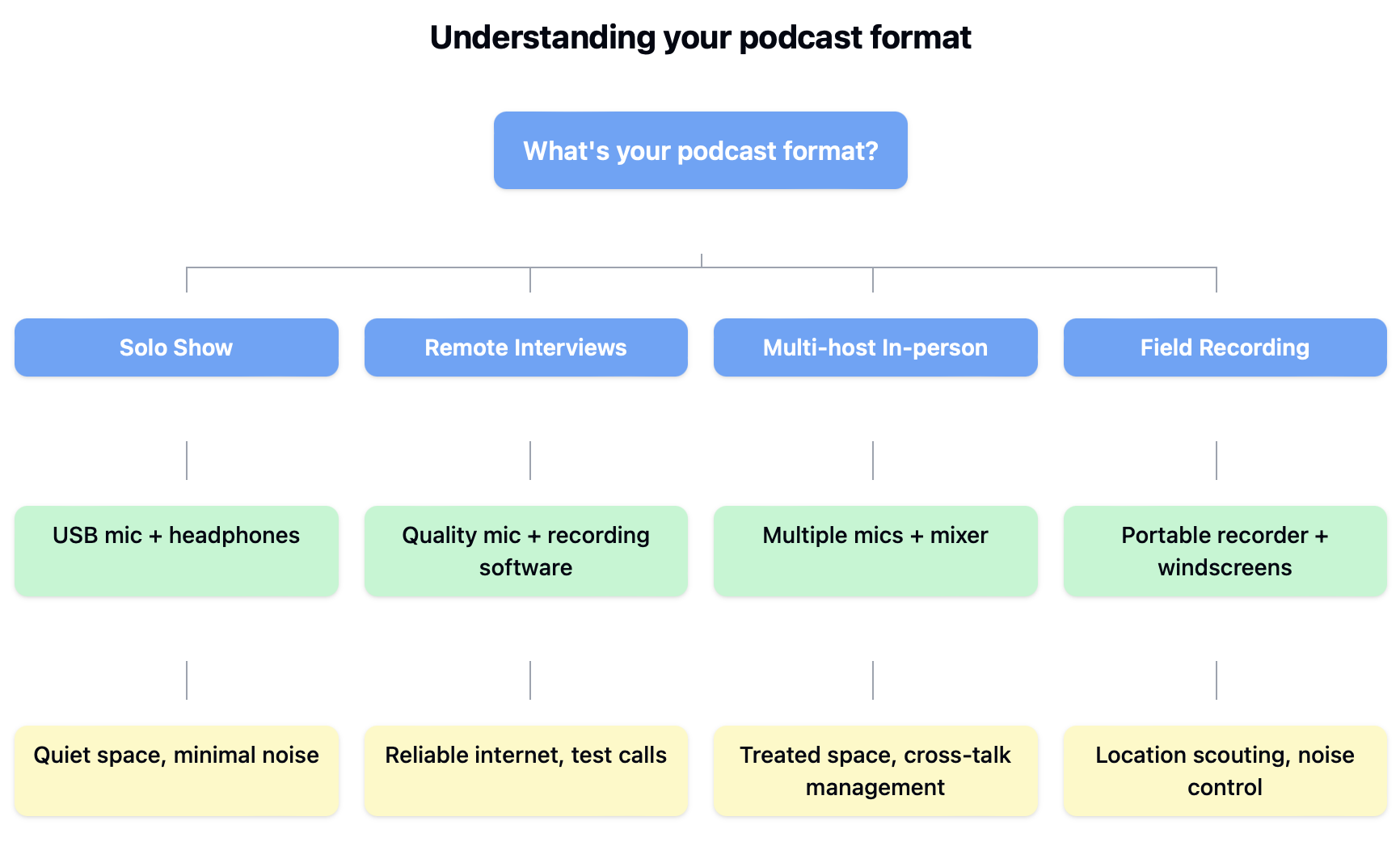
Your podcast format directly impacts what equipment you'll need. A solo show has different requirements than an interview-based podcast or a roundtable discussion. Let's break down common formats and their equipment implications:
| Format | Core equipment needs | Special considerations |
|---|---|---|
| Solo show | Single microphone, basic interface | Focus on room acoustics and mic quality |
| Interview (Remote) | Quality mic, good headphones, recording software | Need reliable internet and backup recording |
| Multi-host (In-person) | Multiple mics, audio interface, mixer | Room setup and multi-track recording essential |
| Field recording | Portable recorder, mobile mics | Durability and battery life important |
Recording environment matters
Your recording space significantly affects equipment choices. According to Band Barracks, three common audio issues — muffled sound, background noise, and uneven levels - often stem from poor room acoustics rather than equipment limitations.
Consider your recording environment: A dedicated home office might benefit from a sensitive condenser microphone, while a noisy apartment would do better with a dynamic mic that rejects background sound. For those recording in multiple locations, investing in portable gear with good noise rejection capabilities makes more sense than expensive studio equipment.
Setting a realistic budget
The podcast market offers equipment at every price point. Based on various prices of equipment, here's what you can expect to achieve with different budgets:
| Budget level | Total investment | What you can achieve |
|---|---|---|
| Starter | $0-$100 | Basic but functional setup using existing devices and minimal new gear |
| Enthusiast | $100-$300 | Good quality audio with room to grow |
| Semi-Pro | $300-$800 | Professional sound quality and more flexibility |
| Professional | $800+ | Broadcast quality with all the bells and whistles |
Technical comfort level
Be honest about your technical expertise. While professional equipment offers more control, it also requires more knowledge to use effectively. Many new podcasters find greater success starting with simpler equipment and upgrading as they gain experience.
This measured approach allows you to:
- Learn the basics without feeling overwhelmed
- Develop good recording habits
- Understand what additional features you actually need
- Make informed decisions about future upgrades
Remember, the best equipment choice is one that you'll actually use consistently. Even basic gear used well can produce better results than premium equipment used incorrectly.
Microphones for podcast
Your microphone choice forms the foundation of your podcast's sound quality. According to B&H Photo, selecting the right microphone for your specific situation matters more than simply buying the most expensive option.
Popular USB microphones
For those seeking plug-and-play simplicity, USB microphones offer direct computer connectivity and easy setup. Here's what you can expect from leading USB models in 2025:
| Brand | Model | Price | Key features | Known for |
|---|---|---|---|---|
| Logitech | Blue Yeti X | $129.99 | Four polar patterns, LED metering | Versatile streaming mic |
| Elgato | Elgato Wave 3 | $150 | Anti-clipping tech, proprietary mixing | Streamer-focused features |
| HyperX | HyperX QuadCast S | $159.99 | RGB lighting, tap-to-mute sensor | Gaming and streaming |
Professional XLR microphones
For studio-quality recordings, XLR microphones paired with an audio interface deliver superior sound. Here are top professional options:
| Brand | Model | Price | Key features | Known for |
|---|---|---|---|---|
| Shure | Shure SM7B | $399 | Industry standard, built-in shock mount | Professional broadcast quality |
| PreSonus | PreSonus PD-70 | $100 | Integrated windscreen, broadcast design | Background noise rejection |
| Electro-Voice | Electro-Voice RE20 | $449 | Variable-D technology, internal shock mount | Radio broadcast standard |
Hybrid USB/XLR microphones
These versatile mics offer both connection types, allowing you to start simple and upgrade later:
| Brand | Model | Price | Key features | Known for |
|---|---|---|---|---|
| Shure | Shure MV7+ | $279 | Touch panel, auto-level mode | Professional hybrid flexibility |
| Audio-Technica | Audio-Technica ATR2100x | $53 | Lifetime warranty, includes cables | Budget-friendly versatility |
Prices may vary by retailer and region. Features and specifications current as of early 2025.
Microphone types explained
Two main types of microphones dominate the podcast space: dynamic and condenser. Each serves different needs and recording environments.
Dynamic microphones excel at rejecting background noise and handling less-than-perfect recording spaces. They're more forgiving of room acoustics, making them ideal for home studios. Condenser microphones, while offering pristine audio quality, require properly treated rooms to shine.
| Microphone type | Best for | Room requirements | Typical price range |
|---|---|---|---|
| Dynamic | Home studios, untreated rooms | Minimal | $60-$400 |
| Condenser | Professional studios, voice-over | Acoustic treatment needed | $100-$1000+ |
Connection types: USB vs XLR
The way your microphone connects to your recording device significantly impacts both setup complexity and future flexibility. According to Audio-Technica, both USB and XLR options can produce professional results.
USB microphones: Perfect for beginners, these microphones plug directly into your computer. They require minimal setup and often include built-in audio processing. However, they offer less flexibility for upgrading your setup later.
XLR microphones: The professional standard, XLR microphones connect through an audio interface. While requiring additional equipment, they provide superior audio quality and more control over your sound. Many podcasters eventually migrate to XLR setups as their shows grow.
A note on future-proofing
Consider starting with a hybrid USB/XLR microphone if your budget allows. These versatile mics let you begin with simple USB connectivity while providing the option to upgrade to professional XLR equipment later. This approach saves money long-term by avoiding the need to replace your microphone as your podcast grows.
**Want to save money on your next mic? **Find microphone promo codes here
Headphones for podcast
Proper monitoring through quality headphones is crucial for podcast production. Using the right headphones helps you catch audio issues before they become problems in your final recording. Let's explore what makes headphones specifically suitable for podcasting and which models offer the best value at different price points.
Why headphones matter for podcasting
Professional podcasters rely on closed-back headphones for both recording and editing. These headphones seal around your ears to prevent audio leakage that could be picked up by your microphone. They also block external noise, helping you focus on the details of your recording.
When recording with guests or co-hosts, proper headphone monitoring becomes even more critical. Hello Studios notes that using speakers instead of headphones during remote recordings can create echo and feedback problems that ruin your audio.
Entry-level monitoring headphones
For podcasters just starting out, these budget-friendly options offer professional features without breaking the bank:
| Brand | Model | Price | Key features | Known for |
|---|---|---|---|---|
| Audio-Technica | Audio-Technica ATH-M20x | $35 | 40mm drivers, closed-back design | Beginner-friendly monitoring |
| Sony | Sony MDR-7506 | $99 | Foldable design, industry standard | Broadcast studio favorite |
| Tascam | Tascam TH-02 | $20 | Padded headband, foldable design | Budget studio monitoring |
| Status Audio | Status Audio CB-1 | $59-$80 | 50mm drivers, detachable cable | Comfort-focused design |
Mid-range professional headphones
These models offer enhanced audio quality and durability for serious podcasters:
| Brand | Model | Price | Key features | Known for |
|---|---|---|---|---|
| Shure | Shure SRH840A | $149 | Detachable cable, precise audio | Detail-oriented monitoring |
| Audio-Technica | Audio-Technica ATH-M50x | $150 | 45mm drivers, pro-grade materials | Studio standard |
| Sennheiser | Sennheiser HD280 PRO | $129 | Noise isolation, rugged build | Long-term reliability |
Premium studio headphones
For professional podcast production requiring the highest quality monitoring:
| Brand | Model | Price | Key features | Known for |
|---|---|---|---|---|
| Beyerdynamic | Beyerdynamic DT 1770 Pro | $369-$649 | Tesla drivers, premium build | Superior clarity |
| Shure | Shure SRH1540 | $499 | Carbon fiber construction, premium drivers | Premium comfort |
| Neumann | Neumann NDH 20 | $499 | Studio reference quality, metal build | Professional accuracy |
| Austrian Audio | Austrian Audio Hi-X65 | $399-$429 | Handmade in Vienna, pro monitoring | Precision audio |
Prices may vary by retailer and region. All models feature closed-back designs recommended for podcast production. Features and specifications current as of early 2025.
Key specifications comparison
| Model | Driver size | Impedance | Frequency response | Replaceable parts |
|---|---|---|---|---|
| ATH-M20x | 40mm | 47 ohms | 15-20,000 Hz | Ear pads |
| MDR-7506 | 40mm | 63 ohms | 10-20,000 Hz | Ear pads, cable |
| SRH840A | 40mm | 44 ohms | 15-25,000 Hz | Ear pads, cable, headband |
| DT 1770 Pro | 45mm | 250 ohms | 5-40,000 Hz | All components |
Note: Higher impedance headphones may require additional amplification for optimal performance.
Understanding headphone specifications
Here's what various technical specifications mean for podcast production:
| Specification | What it means | Why it matters for podcasting |
|---|---|---|
| Closed-back design | Ear cups sealed to block sound | Prevents mic bleed and echo |
| Driver size | Speaker diameter (usually 40-50mm) | Affects clarity and bass response |
| Impedance | Electrical resistance | Determines power requirements |
| Frequency response | Range of reproducible sounds | Ensures accurate voice monitoring |
**Want quality headphones and a great deal? **Find headphone discount codes here
Comfort and durability considerations
Long editing sessions demand comfortable headphones. Key comfort features to evaluate:
| Feature | Impact on usage | Typical price premium |
|---|---|---|
| Padded headband | Reduces pressure during long sessions | $20-$50 extra |
| Replaceable ear pads | Extends usable life | $10-$30 per replacement |
| Adjustable fit | Accommodates different head sizes | Standard |
| Cable design | Affects mobility and durability | $20-$40 for detachable |
Professional monitoring techniques
Proper monitoring technique matters as much as equipment quality. Audio professionals recommend:
- Setting appropriate volume levels: Keep monitoring volume moderate to prevent ear fatigue and maintain consistent audio judgment.
- Regular position checks: Ensure headphones maintain proper seal around your ears throughout recording.
- Taking breaks: Even with comfortable headphones, schedule short breaks during long editing sessions to rest your ears.
A note about wireless headphones
While wireless headphones are convenient for listening to podcasts, they're not recommended for recording. According to Pod Lad, the latency (delay) in wireless transmission can throw off your timing and create monitoring issues. Stick with wired headphones for podcast production.
Future-proofing your investment
Consider these factors for long-term value:
- Replaceable components: Models with replaceable ear pads and cables cost more initially but last longer.
- Warranty coverage: Professional models often include longer warranties and better support.
- Compatibility: Choose headphones that work with both consumer devices and professional audio equipment to maintain flexibility as your setup grows.
Audio interfaces for podcast
When your podcast grows beyond a simple USB microphone setup, audio interfaces and dedicated recording devices become essential tools. According to Castos, the right interface can significantly improve your audio quality while providing the flexibility to expand your show's capabilities.
Understanding audio interfaces
An audio interface converts analog audio signals from microphones into digital information your computer can record. These devices typically connect via USB and provide professional XLR inputs for microphones, along with dedicated headphone outputs for monitoring.
Entry-level audio interfaces
Perfect for solo podcasters and beginners transitioning from USB microphones:
| Brand | Model | Price | Key features | Known for |
|---|---|---|---|---|
| Focusrite | Focusrite Scarlett Solo | $139.99 | 1 XLR input, high-quality preamp | Clean, simple operation |
| Behringer | Behringer UMC202HD | $69 | Dual inputs, 24-bit/192kHz | Value performance |
Podcast production interfaces
Designed specifically for podcast recording with multiple hosts and guests:
| Brand | Model | Price | Key features | Known for |
|---|---|---|---|---|
| Zoom | Zoom PodTrak P4 | $149 | 4 XLR inputs, mix-minus | Podcast-specific features |
| TASCAM | TASCAM Mixcast 4 | $399 | 4 channels, multi-track recording | Streaming integration |
| PreSonus | PreSonus Revelator io44 | $199.95 | Voice effects, loopback audio | Streaming features |
Professional studio interfaces
For professional podcast studios requiring premium audio quality:
| Brand | Model | Price | Key features | Known for |
|---|---|---|---|---|
| Universal Audio | Universal Audio Apollo Twin X | $799 | Premium preamps, DSP effects | Studio standard |
| Solid State Logic | SSL 2+ | $299 | Legacy 4K mode, high-end conversion | Professional sound |
| Focusrite | Focusrite Clarett+ 4Pre | $699 | Air-enabled preamps, ADAT expansion | Expandability |
| Audient | Audient iD14 MKII | $299 | Console-grade preamps, digital I/O | Premium quality |
Key specifications comparison
| Model | Inputs | Sample rate | Bit depth | Mobile power |
|---|---|---|---|---|
| Scarlett Solo | 1 XLR, 1 TRS | 192 kHz | 24-bit | USB powered |
| PodTrak P4 | 4 XLR | 48 kHz | 24-bit | Battery/USB |
| Apollo Twin X | 2 XLR/TRS | 192 kHz | 24-bit | External PSU |
| Zoom H6 | 4 XLR + 2 mic | 96 kHz | 24-bit | Battery/USB |
Prices and specifications current as of early 2025. All interfaces include monitoring outputs for headphones. Many manufacturers offer educational and bundle discounts.
When to upgrade to an interface
The transition from USB microphones to an interface setup typically occurs when podcasters face these scenarios:
| Scenario | Why an interface helps | Typical investment |
|---|---|---|
| Multiple hosts/Guests | Enables recording separate mic channels | $150-$300 |
| Quality demands | Provides cleaner, more detailed audio | $200-$500 |
| Professional growth | Offers more control and flexibility | $300-$1,000 |
| Remote recording | Allows mix-minus setups for remote guests | $200-$400 |
Field recording solutions
Portable recorders serve a unique purpose in podcast production, especially for interviews and location recording. Here's how different options compare:
| Recorder | Best for | Key features | Price |
|---|---|---|---|
| Zoom H6 | Professional field work | 6 XLR inputs, interchangeable mics | $310 |
| Tascam DR-40X | Location recording | 4-channel recording, phantom power | $179 |
| Zoom PodTrak P4 | Mobile podcast studio | 4 XLR inputs, podcast-specific features | $149 |
**Capture sound without breaking the bank! **Click here for audio equipment coupons
Interface features that matter for podcasting
Understanding key specifications helps make informed decisions:
- Preamp quality: Determines how clean and natural voices sound. According to The Podcast Consultant, preamp quality often distinguishes professional-grade interfaces from budget options.
- Input/Output configuration: Consider not just current needs but future expansion. Having extra inputs allows your setup to grow.
- Sample rate and bit depth: While 44.1kHz/16-bit is sufficient for podcasting, many interfaces offer 48kHz/24-bit recording for extra headroom and quality.
Future-proofing considerations
When selecting an interface, consider these long-term factors:
- Driver support: Choose manufacturers known for long-term software support.
- Expandability: Interfaces with ADAT or MIDI connectivity offer room for growth.
- Build quality: Professional interfaces often feature metal construction and premium components that last longer than plastic budget models.
Remember, while better equipment can improve your podcast's sound quality, proper setup and usage matter more than premium features. Start with an interface that matches your current needs while providing room for growth.
Essential accessories for podcast
While microphones and interfaces form the core of your podcast setup, the right accessories can significantly improve your recording quality. According to Resonate Recordings, professional podcasters often find that seemingly small additions make a substantial difference in their production quality.
Microphone mounting solutions
Your microphone mount affects both sound quality and usability. Professional studios typically use two main mounting options:
| Mount type | Best for | Price range | Key benefits |
|---|---|---|---|
| Desktop stand | Simple setups, limited space | $20-$50 | Stability, portability |
| Boom arm | Professional setups, flexibility | $70-$200 | Adjustability, cable management |
Pop filters and windscreens
These essential accessories prevent common audio problems:
- Pop filters: Shield your microphone from plosive sounds ("p" and "b" noises) that can ruin recordings.
- Windscreens: Provide an additional layer of protection against breath noise and minor vibrations. Most cost between $15-$30 and are worth the investment for clearer recordings.
Cable management essentials
Proper cable management impacts both audio quality and studio organization. Lon Ltd recommends a systematic approach:
| Cable type | Recommended solution | Approximate cost |
|---|---|---|
| XLR Cables | Mogami Gold Studio | $30-$50 per cable |
| Power Cables | Cable ties with velcro | $10-$15 pack |
| USB Cables | Braided, reinforced | $15-$25 each |
The Triad-Orbit CCM Cable Control system ($23.99) offers professional-grade management without damaging cables - a worthwhile investment for permanent setups.
Acoustic treatment fundamentals
Room acoustics significantly impact recording quality. According to Mix Monster, even basic treatment can dramatically improve your sound:
Entry-level treatment package:
- 4-6 absorption panels for primary reflection points
- 2-4 bass traps for room corners
- 1-2 ceiling clouds above the recording area
Professional studios aim for a reverberation time of 0.8-0.9 seconds, notes Second Skin Audio. While professional treatment can be expensive, DIY solutions using quality materials can provide excellent results:
| Treatment type | Professional cost | DIY alternative | Purpose |
|---|---|---|---|
| Wall panels | $100-$200 each | $30-$50 each | Absorb reflections |
| Bass traps | $150-$300 each | $40-$80 each | Control low frequencies |
| Ceiling cloud | $300-$500 | $100-$200 | Manage overhead reflections |
Shock mounts and isolation
A quality shock mount isolates your microphone from vibrations that can create unwanted noise. While some microphones include shock mounts, universal options provide flexibility:
| Mount type | Compatibility | Price range | Key features |
|---|---|---|---|
| Universal | 44-47mm mics | $30-$50 | Fits most mics |
| Brand specific | Model matched | $50-$100 | Perfect fit, premium quality |
| Premium | Custom sizing | $100-$200 | Professional isolation |
Storage and organization
Protecting your investment requires proper storage solutions. It’s recommended to organize your studio with:
- Microphone storage: Padded cases or wall mounts ($20-$40) protect sensitive equipment when not in use.
- Cable organization: Dedicated cable boxes or racks ($15-$30) prevent tangling and damage.
- Accessory management: Clear bins or drawer systems ($30-$50) keep small items accessible.
The extras that matter
While not essential, these additional accessories can enhance your podcast production:
- Voice processing tools: Hardware or software that enhance voice quality ($100-$500).
- Backup power supply: UPS systems prevent lost recordings during power issues ($100-$200).
- Mobile recording kit: Portable setup for location recording ($200-$500).
Remember that accessories should solve specific problems or improve your workflow. Start with essentials like proper mounting and pop filters, then add other items as your needs develop and budget allows.
Complete podcast starter kits from budget to pro
Understanding what you can achieve at different budget levels helps make smart purchasing decisions. Many successful podcasts started with basic equipment and upgraded gradually as their needs evolved. Let's explore complete setups at different price points.
Pre-packaged starter kits: The all-in-one option
For those who prefer a complete solution, pre-packaged podcast kits offer everything needed to start recording in one box. These bundles can save 15%-30% compared to buying components separately, while ensuring all pieces work together seamlessly.
Available kit types and pricing
The market offers podcast bundles at several price points, each targeting different user needs:
| Kit level | Price range | Typical components | Best for |
|---|---|---|---|
| Entry-Level | $100-$200 | USB mic, basic headphones, stand | Solo beginners |
| Mid-Range | $200-$500 | XLR/USB mic, interface, quality headphones | Growing shows |
| Professional | $500+ | Premium mic, mixer, pro headphones | Commercial podcasts |
Examples of pre-packaged podcast starter kits
Entry-level: The Maono AMC2 NEO + PD200X Kit ($120) represents excellent value for beginners. This bundle includes:
- Dual-mode dynamic microphone
- AMC2 sound card interface
- Basic monitoring headphones
- All necessary cables and accessories
- One-year warranty coverage
Mid-range: The Focusrite Vocaster One Studio ($250) bridges the gap between amateur and professional setups with:
- Professional-grade interface with podcast-specific features
- Dynamic microphone optimized for voice
- Quality monitoring headphones
- Comprehensive software bundle
- Three-year warranty protection
Professional: The RODE Podcaster Bundle ($911), while expensive, delivers broadcast-quality components. RODE designed this kit for serious podcasters, including:
| Component | Purpose | Typical retail value |
|---|---|---|
| RODECaster Console | Advanced audio control | $699 |
| PodMic | Professional voice capture | $99 |
| NTH-100 Headphones | Premium monitoring | $149 |
| PSA1+ Arm | Professional mounting | $129 |
Potential limitations
Pre-packaged kits aren't perfect for everyone. Common issues include:
- Basic components: Entry-level bundles often include basic headphones that may need upgrading later.
- Limited flexibility: Some kits lack upgrade paths or use proprietary connections.
- Cable quality: Budget bundles may include lower-quality cables that need replacement.
Making the right choice
Consider a pre-packaged kit if you:
- Want a guaranteed compatible setup
- Prefer simplified purchasing
- Need comprehensive warranty coverage
- Value immediate startup capability
Build your own kit if you:
- Have specific component preferences
- Plan to upgrade gradually
- Want maximum flexibility
- Need specialized features
Remember that great content matters more than expensive gear. Start with equipment that matches your current needs and upgrade strategically as your podcast grows.
How to save money on podcast gear
Quality podcast equipment doesn't always require paying full price. Finding audio equipment discounts, and knowing where to shop are the key to saving money on podcast gear.
Understanding retailer strategies
Different retailers offer unique advantages when shopping for podcast gear:
Big box retailers: Price matching policies often allow you to combine competitor prices with reward programs. Stores like Best Buy frequently offer bundle deals during major sales events.
Stores:
- Best Buy: Price matching, Geek Squad support, frequent sales events
- Guitar Center: Price matching, in-store demos, educational discounts
- Sam's Club/Costco: Member pricing, extended warranties, bundle deals
- Micro Center: Price matching, knowledgeable staff, local stock
Specialty audio stores: While prices might be higher, these retailers often provide:
- Expert advice and support
- Extended warranties
- Professional installation services
- Exclusive bundle packages
Stores:
- Sweetwater: Expert support, free tech support, extended warranties
- B&H Photo: Educational pricing, professional services, specialist knowledge
- Adorama: Price matching, bundle deals, expert reviews
- Full Compass: Pro audio focus, technical support, commercial accounts
Online marketplaces: Amazon and similar platforms frequently offer competitive prices, but require careful research:
| Platform | Advantages | Watch out for |
|---|---|---|
| Amazon | Fast shipping, easy returns | Third-party sellers, authenticity |
| Thomann | European pricing, unique brands | Import fees, longer shipping |
| Reverb | Used gear, unique finds | Individual sellers, condition accuracy |
| zZounds | Payment plans, fast shipping | Limited price matching |
Evaluating used equipment
The used market offers excellent value when approached carefully. Clean Cut Audio provides this framework for evaluating used gear:
Research phase:
- Check typical used prices across multiple platforms
- Research common issues for specific models
- Verify warranty transferability
- Read seller reviews and history
Inspection checklist:
- Test all functions and connections
- Check for physical damage
- Verify firmware/software updates
- Document condition with photos
Making the most of sales events
When major sales approach:
Pre-sale preparation:
- Research normal prices
- Create prioritized shopping lists
- Sign up for retailer newsletters
- Follow manufacturers on social media
During sales:
- Compare prices across multiple retailers
- Stack discounts with a trusted promo code site when possible
- Watch for flash deals
- Consider open-box or display models
Remember that the best deal isn't always the lowest price. Consider factors like warranty coverage, seller support, and long-term reliability when making purchasing decisions.
Start podcasting with confidence
Choosing podcast equipment doesn't have to be overwhelming. Whether you start with a basic USB microphone or invest in a professional studio setup, remember that great content matters more than expensive gear. Many successful podcasts began with simple equipment and upgraded gradually as their needs and audience grew.
Focus first on the essentials:
- A microphone that matches your recording environment
- Comfortable headphones for accurate monitoring
- A reliable way to record and edit
- Basic acoustic treatment for your space
As your podcast grows, you can expand your setup thoughtfully, choosing equipment that enhances your specific show format and style. Remember that even basic gear used well can produce professional results — proper microphone technique and a quiet recording space often matter more than premium equipment.
Ready to start shopping? Browse current podcast equipment deals to find the best prices on your essential gear. And remember, the most important step is simply getting started. Your first episode won't be perfect, but each recording will help you improve both your content and your technical skills.

Sean Fisher
AI Content Strategist
Sean Fisher is an AI Content Strategist at Product.ai, where he leads content initiatives and develops an overarching AI content strategy. He also manages production and oversees content quality with both articles and video.
Prior to joining Product.ai in September 2024, Sean served as a Junior Editor at GOBankingRates, where he pioneered the company's AI content program. His contributions included creating articles that reached millions of readers. Before that, he was a Copy Editor/Proofreader at WebMD, where he edited digital advertisements and medical articles. His work at WebMD provided him with a foundation in a detail-oriented, regulated field.
Sean holds a Bachelor's degree in Film and Media Studies with a minor in English from the University of California, Santa Barbara, and an Associate's degree in English from Orange Coast College.
Stay in the loop
Get our latest research.
Promo code studies, seasonal shopping guides, industry savings reports. No spam — unsubscribe any time.